Back









































 Shipping Basics


Cyber Monday shipping works best when your delivery promise matches warehouse capacity, carrier transit times, and real order volume. Miss that match, and conversion drops fast during the busiest stretch of the holiday shopping season. This guide shows how to set order cutoff times, choose smart free shipping offers, route expedited shipping, and use shipment tracking so shoppers know what to expect.
Cyber Monday shipping becomes challenging because demand spikes in a tight timeframe. Black Friday starts the rush, then Cyber Monday pushes even more online orders into the same supply chain, carrier network, and warehouse labor pool. That pressure shows up in late picks, missed handoffs, and delivery windows that were too ambitious from the start.
The fix is proactive planning. ShipStation processed 28.5 million labels during Cyber Week 2024 with no performance lag, so it is clear increased volume alone is not the problem. Broken workflows are. Your goal is to build promises around real capacity for package delivery, not around best-case assumptions from a normal week.
The best Cyber Monday plan starts before shoppers hit checkout. Set rules, pressure test inventory, and decide which delivery service options you can truly support. If your team waits until the spike begins, every later fix costs more time and customer trust.
Start with expected order volume by sales channel, product type, and ship-from location. A flash sale on small accessories creates one kind of workload. A Cyber Monday deals push on gift bundles or fragile items creates another. Forecasting by SKU mix helps you estimate labor, packaging needs, and which carrier services you will rely on most.
Then map volume against carrier transit times and daily label output. Watch for weak points like one warehouse handling too many expedited orders or one channel producing oversized packages. If you want tighter rate control at checkout, [ShipStation’s rate shopper](/fulfillment/shipping/rate-shopper/) and [ShipStation API checkout rates](/fulfillment/api/checkout/) help you line up shipping choices with the promise you show shoppers.
Peak season exposes poor inventory faster than almost anything else. Before Cyber Monday starts, check item locations, confirm stock buffers, and fix listings that could oversell across channels. Small count errors become big service failures when order volume jumps.
Barcode scanning matters here. ShipStation supports 99%+ inventory accuracy across physical and digital counts through barcode based workflows. Inventory also syncs across 10+ channels every hour, which helps reduce stale stock numbers during fast-moving promotions. If you rely on mobile picking, that matters too: customers have seen a 30% to 40% increase in labor efficiency compared with printed pick lists.
Automation removes repeat clicks when you need speed most. Before the rush, set rules for carrier selection, service mapping, package types, tags, and ship-from logic. Decide which orders should move straight through and which ones need review.
Batch printing should be ready before the first surge. ShipStation automation cuts clicks per order by 40% and lets merchants create up to 15x more labels per hour. Also confirm your handoff plan. If your warehouse uses daily pickups, make sure pickup timing, manifest steps, and carrier drop-off backups are clear before Cyber Monday starts.
During the event, speed matters, but control matters more. The fastest teams do not rush every order the same way. They route exceptions, protect high-risk promises, and keep the floor focused on the next most important task.
Not every order needs the same response. Sort by promised delivery window, service level, order age, and exception type. A delayed gift order with expedited shipping should not wait behind a low-urgency standard order placed five minutes earlier.
Multi-carrier routing helps when one lane gets tight. Spread package delivery volume across UPS®, USPS®, and FedEx® based on cost, timing, and destination. If you compare services in real time, use carrier transit times as the guardrail, not the cheapest label alone. That keeps your delivery promise tied to what each delivery service can actually support that day.
When order volume jumps, simple picking mistakes multiply. A wrong size, wrong color, or empty bin slows the line, creates rework, and triggers unhappy shoppers. Clean warehouse logic beats heroic effort every time.
Use clear pick paths, live inventory updates, and scan checks at pack-out. ShipStation mobile picking has helped customers improve labor efficiency by 30% to 40%, and barcode-driven workflows support 99%+ inventory accuracy. That reduces the likelihood of oversells, backorders, and reshipments during the busiest days of the holiday shopping season.
Customers do not need perfect speed. They need clear expectations. If order cutoff times change, or a delivery window gets tighter, update that message on product pages, checkout, and order confirmation emails right away.
Post-purchase communication matters even more once the package leaves your dock. [Shipment tracking and post-purchase tracking](/fulfillment/shipping/tracking/) lower anxiety because shoppers can see status without asking your team for updates. Branded tracking pages and real-time notifications keep customers in the loop and cut down on “where’s my order” contacts that eat into peak-day support time.
Cyber Monday free shipping works when you control the offer, not when the offer controls you. Set a free shipping threshold, define where standard shipping still fits your margin, and make expedited shipping an upgrade instead of an assumption.
Free shipping Cyber Monday offers should start with a promise you can keep. Do not advertise “arrives by” language unless carrier transit data and order cutoff times support it. If the window is tight, show an estimated delivery window instead, and place faster services next to it as paid upgrades.
Use this simple planning table before you publish Cyber Monday deals free shipping offers:
| Promise shown to shoppers | What must support it | Best use case | What to show at checkout |
|---|---|---|---|
| Free standard shipping | Stable carrier transit times and enough pick capacity (orders per day your team can pick and pack without missing your handling-time promise, with a peak buffer) | Margin-protected carts above your free shipping threshold | Estimated delivery window (handling time + carrier transit + peak cushion) |
| Paid expedited shipping | Late-day fulfillment capacity, priority pick rules, and carrier pickup times | Last-minute gift buyers | Clear order cutoff times, stated in a specific time zone |
| Guaranteed delivery date | Internal buffer, reliable handoff timing, and a defined remedy if the date is missed | Only when your operation can defend the promise | Exact promise language, consistent across product page, cart, checkout, and confirmation email |
| Post-purchase updates | Tracking integration and a proactive delay-notification process | All orders, especially during backlog | Tracking updates and delay emails |
A strong free shipping threshold also helps. If standard shipping costs squeeze margin on low-value carts, set the threshold high enough to raise average order value while keeping the offer simple for shoppers.
Product mix changes labor, materials, and service choice. Apparel, beauty, electronics, gift sets, and oversized items all move differently. A pajama set, crewneck sweatshirt, eau de toilette, LED accessory, or big car item may all sell on the same day, but they should not share the same pack-out plan.
Group products by shipping behavior before the event. Fragile items may need added protection. Bundles may need kitting space. Apparel may drive more returns. Oversized goods may force different delivery service rules. When you plan packaging and routing by category, you reduce damage risk, limit delays, and keep your warehouse from treating every order like a one-off case.
The rush does not end when the last label prints. Your best learnings come right after the spike, while delays, misses, and workarounds are still easy to spot. Review what happened before the next peak forces you to relearn the same lesson.
Start with core numbers: label volume by day, on-time handoff rate, exception rate, and support contacts tied to package delivery. Then review carrier performance by zone and service. A service that looked cheap may have created expensive customer follow-up.
ShipStation gives teams one dashboard for orders and shipping workflows, which makes post-event review easier. Look closely at shipping errors, too. Automation can reduce shipping errors by up to 100%, so any repeat error pattern usually points to missing rules, poor product data, or unclear warehouse steps.
Your postmortem should end with specific workflow changes. That may mean earlier order cutoff times, different free shipping thresholds, more automation rules, or clearer exception queues. It may also mean shifting which products qualify for expedited shipping.
Keep the list short and operational. A good peak review should answer four things:
Peak shipping gets easier when one system connects orders, automation, carriers, and tracking. ShipStation helps merchants centralize fulfillment, reduce manual work, and keep promises realistic from checkout through delivery.
ShipStation pulls orders into one dashboard, applies shipping logic, and keeps high-volume days moving with batch workflows. Merchants use automation rules for carrier choice, service mapping, tags, and ship-from routing. That matters in peak season because less manual decision-making means fewer delays.
The results are practical. Automation cuts clicks per order by 40%, can create up to 15x more labels per hour, and helps reduce shipping errors by up to 100%. For teams managing fast growth, that is the difference between controlled scale and daily cleanup.
ShipStation supports inventory and warehouse workflows that help teams ship accurately under pressure. Inventory sync across 10+ channels every hour helps reduce oversells. Barcode-based workflows support 99%+ inventory accuracy, which protects order quality during volume spikes.
Warehouse teams can also use mobile picking to move faster than paper-based processes. Customers have seen a 30% to 40% increase in labor efficiency with mobile picking versus printed pick lists. During Cyber Monday shipping, that extra speed helps your team keep up without turning every shift into manual rework.
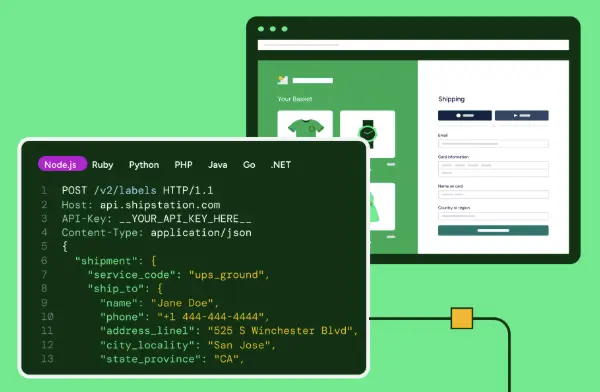
Carrier choice matters more when the holiday shopping season compresses delivery windows. ShipStation connects 200+ store and marketplace integrations and 200+ global carrier integrations, so teams can compare services and route orders with more control. For developers, ShipStation API adds real-time checkout rates, label creation, and tracking into existing systems.
Tracking visibility matters after the order ships. ShipStation supports shipment tracking, branded tracking pages, and real-time notifications so customers see progress without extra support emails. When shoppers trust the delivery promise and can follow the package, they are more likely to stay calm even when Cyber Monday volume pushes the network hard.
Cyber Monday shipping does not need perfect conditions. It needs accurate promises, clear order cutoff times, smart free shipping thresholds, and strong tracking after checkout. If you want tighter rate control, better shipment tracking, and more automation before the next peak, explore [rate shopper](/fulfillment/shipping/rate-shopper/), [tracking](/fulfillment/shipping/tracking/), and [ShipStation API checkout rates](/fulfillment/api/checkout/).
Black Friday often starts the volume surge, but Cyber Monday usually puts more pressure on online fulfillment because order flow skews harder toward digital channels. For shipping teams, that means faster label growth, tighter delivery windows, and more demand for free shipping and expedited upgrades.
Cyber Monday orders take longer when order volume outruns warehouse capacity or carrier transit times. Delays usually come from late order handoff, bad inventory data, unrealistic delivery promises, or weak exception handling, not from one single cause.
No. Higher volume raises risk, but it does not guarantee poor performance. Teams that forecast demand, automate label workflows, and set realistic order cutoff times are better equipped to keep package delivery moving during peak days.
Start with a free shipping threshold that protects margin. Then pair standard free shipping with a realistic delivery window, and keep expedited shipping as a paid option when shoppers need faster service.
Triage first. Prioritize orders by promised delivery date, route exceptions into a separate queue, and update checkout and post-purchase messaging right away. Then shift labor toward the orders with the highest customer impact and use shipment tracking updates to reduce inbound support pressure.