Back
Back













































 Ecommerce Growth


Ecommerce warehouse management integration keeps orders, stock counts, and shipping updates in sync across your store, warehouse, and carrier workflows. When it works well, you cut manual entry, reduce oversells, and move orders faster. This guide breaks down how integration works, what real-time visibility should look like, and where our platform fits into day-to-day fulfillment.
Ecommerce warehouse management integration connects your selling channels, warehouse management system, and shipping software, so data moves automatically between them. Instead of updating multiple systems by hand, your team works from synced orders, current stock counts, and shared shipment status.
For ecommerce businesses, a solid integration helps with inventory control, order processing, picking, packing, and tracking. It also gives your business a cleaner flow from checkout to delivery. When Shopify, Amazon, WooCommerce, and your warehouse tools share the same data, your team spends less time fixing mismatches and more time getting orders out the door.
Real-time inventory is the core benefit most teams need first. When inventory updates as orders are placed, picked, packed, or received, you get better inventory accuracy and fewer stock surprises across sales channels.
That real-time data supports better decisions across your supply chain. Your team can see what is committed, what is on hand, and what is available by location. Real-time visibility also helps customer-facing teams set clearer expectations. If a product is low in one warehouse but available in another, your systems can reflect that before a customer places an order.
The ShipStation platform supports inventory tracking in ShipStation and can also connect with external inventory management software when another system already handles stock.
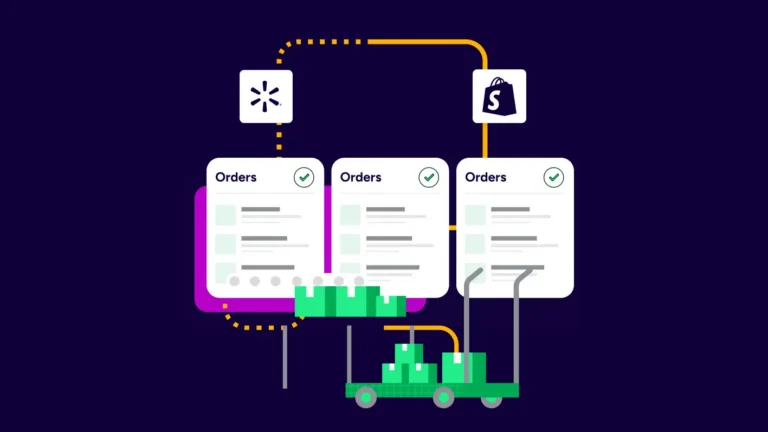
A warehouse management system works best when it shares data with the rest of your stack. The goal is simple: orders come in once, warehouse actions update status once, and shipping details push back once.
A typical ecommerce warehouse management integration looks like this:
That flow reduces repeated data entry and helps your team work more efficiently. It also gives better control when order volume grows.
Integration matters even more when orders ship from multiple locations. Without shared data, multi-site fulfillment can lead to duplicate work, missed inventory updates, and routing errors.
With the right setup, warehouse operations stay connected across warehouses. Orders can carry ship-from details, stock data can stay location-aware, and fulfillment teams can work from the same source of truth. Our platform supports multiple ship-from locations from a single dashboard, and location data can flow into connected warehouse systems when the integration supports it.
That helps companies manage inventory accuracy across separate facilities, whether those locations are a main warehouse, a second site, or a smaller overflow space. It also speeds up order fulfillment when the closest location can take the order.
Shipping should not sit outside your warehouse workflow. When shipping connects directly to your management system WMS setup, your team can move from picked order to printed label without rekeying data.
That improves efficiency in a few concrete ways:
With ShipStation, you can compare UPS®, USPS®, FedEx®, and DHL Express rates side by side, use your own carrier accounts, or mix them with available discounted options. You can also batch print labels, send branded tracking updates, and push shipment data back to connected systems. That tighter loop helps control shipping costs while improving the post-purchase experience.
Not every business needs the same setup. Some teams want one platform for shipping, inventory tracking, and basic warehouse tasks. Others already run advanced inventory management software, an ERP, or a dedicated WMS, and need those systems to stay in place.
ShipStation supports both paths. You can manage inventory directly in ShipStation or connect an external inventory solution. Internal tools include stock tracking, committed inventory, inventory sync for supported channels, and reorder support based on order history. External systems make sense when another platform already owns inventory control or warehouse execution.
The better choice depends on complexity. If your business needs deeper warehouse logic, lot tracking, or specialized picking workflows, a cloud-based warehouse management system may remain your source of record. If you want fewer tools and a simpler setup, native features may cover more than you expect.
ShipStation works well in the middle of the stack because it connects order sources, warehouse workflows, and carrier actions in a single place. The platform integrates with 100+ selling channels and ecommerce platforms, then helps your team route, print, track, and update orders without tab switching.
That connection can support several common needs:
For many ecommerce businesses, that means a single operational hub rather than disconnected tools. Your WMS handles warehouse tasks. The platform handles shipping execution and order flow. Together, the integration closes gaps that create delays and errors.
If a piece cracks from rough handling in transit, or a chocolate shifts and gets scuffed, the presentation is compromised and we’ve failed the customer even if the product tastes perfect.
Extensiv Warehouse Management is one example of a cloud-based warehouse management system that connects with ShipStation in two different ways. The right method depends on which workflow your team wants to own first.
In the Shipping integration, orders start in Extensiv and move into ShipStation after picking. When the shipment is created in ShipStation, tracking information is sent back to Extensiv, which then updates the order. This model fits teams that want the warehouse system to control release timing.
In the Pick Pack integration, selling channels connect directly to ShipStation, and Extensiv connects through the ShipStation API. Extensiv can pull order information, track stock levels, and work with ship-from locations. In this setup, Extensiv updates Custom Field #3 in ShipStation to display the pick-and-pack status. Multi-warehouse compatibility is also supported when a ShipStation warehouse location is assigned to the order.
The best integration is the one your team can actually run every day. Before choosing tools, map the data handoffs that currently create the most work.
Ask these questions first:
Those answers shape the setup. Some companies need a simple commerce stack with clean shipping integration. Others need several systems connected through APIs. Either way, choose tools that reduce clicks and make status easier to trust.
Most integration problems come from unclear ownership, not bad software. If two systems both try to own inventory, or neither system owns customer updates, errors pile up fast.
Watch for these common issues:
A better setup keeps each system’s job clear. Your warehouse management system should manage warehouse execution. Your sales channels should capture demand. ShipStation should connect orders, shipping, tracking, and updates so the entire process moves with less friction.
Ecommerce warehouse management integration works when inventory, warehouse actions, and shipping updates stay connected from the first order import to final delivery. The right setup gives your team better inventory accuracy, real-time visibility, and fewer manual fixes. If you want one place to pull orders, compare rates, print labels, and keep channels updated, our platform is built to help.