

























You just couldn't stay away, could you? Especially not after that cliff-hanger in Testing, Part 1: Stores!
Last Updated Mar 19, 2026 – 2 min read
Don't wait until BFCM volume hits to find your weak points – join us to test your customer journey and build a more profitable peak season.
Save My Spot
One intelligence layer behind every order. Automate workflows, optimise rates in real time, and strengthen delivery performance across every shipment.
See Intelligent Delivery in Action
Compare Australia Post, Couriers Please, and Aramex shipping rates in real-time, so you can start saving on every label.
Start Calculating
We're ready to answer any questions you may have about ShipStation API.
Talk to an Expert
We integrate with how you do business. Move fulfilment onto a single platform that scales with your shipping needs.
Explore All Integrations
We integrate with how you do business. Move fulfillment onto a single platform that scales with your shipping needs.
Explore All Integrations
We integrate with how you do business. Move fulfilment onto a single platform that scales with your shipping needs.
Explore All Integrations
We integrate with how you do business. Move fulfilment onto a single platform that scales with your shipping needs.
Explore All Integrations
We integrate with how you do business. Move fulfilment onto a single platform that scales with your shipping needs.
Explore All Integrations
ELK The Label, a Melbourne-based sustainable fashion brand, was growing fast but held back by manual fulfilment. By centralising operations in ShipStation, the team cut order processing time by up to 70%, reduced picking errors by 98% and grew customer retention by 30%.
Read the Customer StoryDon't wait until BFCM volume hits to find your weak points – join us to test your customer journey and build a more profitable peak season.
Save My SpotWe're ready to answer any questions you may have about ShipStation API.
Get in Touch
You just couldn't stay away, could you? Especially not after that cliff-hanger in Testing, Part 1: Stores!
You just couldn’t stay away, could you? Especially not after that cliff-hanger in Testing, Part 1: Stores! Today, we’ll show you how to test a shipment in ShipStation.
What you’ll need: a free Stamps.com, or alternatively, sign up for a UPS or FedEx account, & a manual ShipStation store or your test store. And, of course, a ShipStation account! If you have everything, we can get to testing.
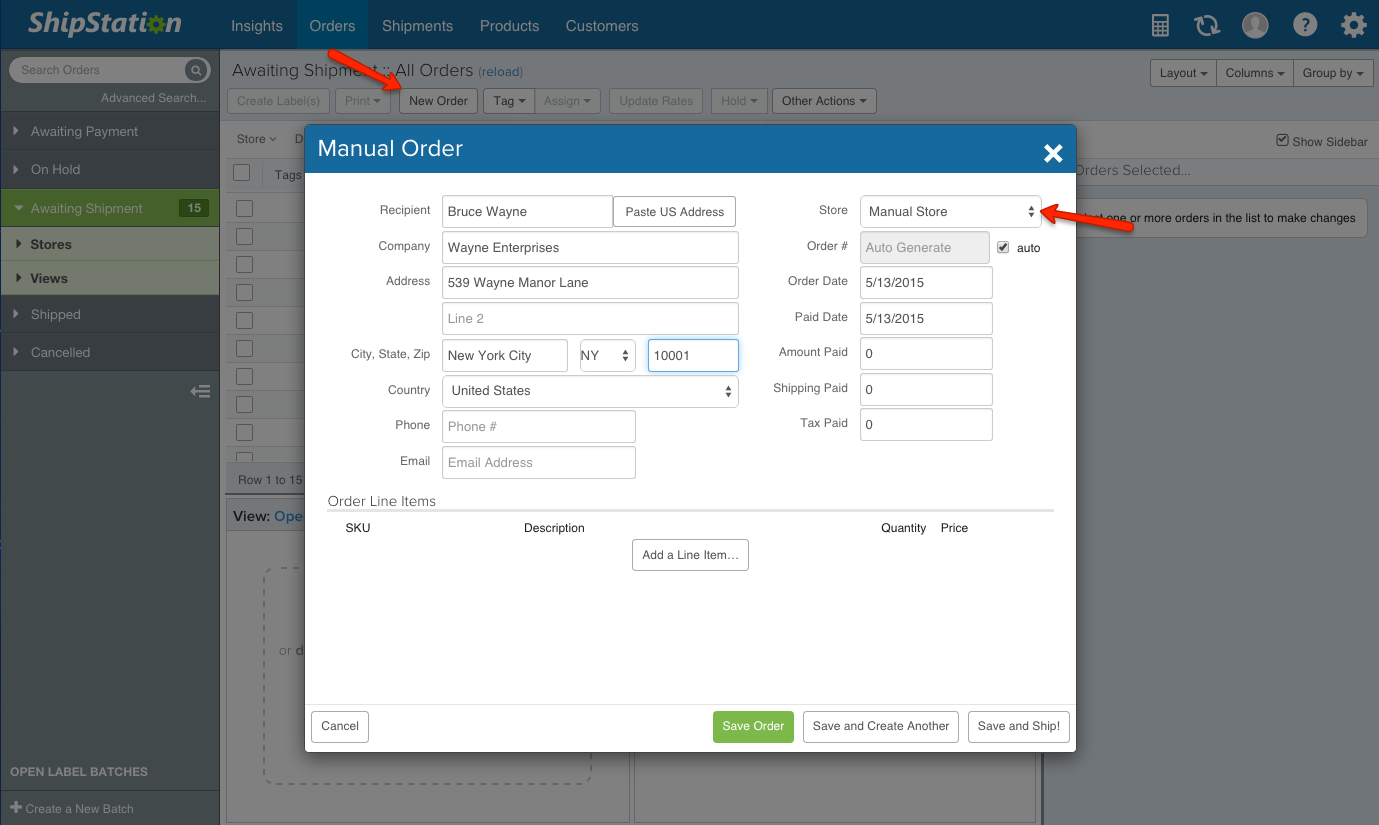
Step numero uno: Create a manual order. Only do this if you do NOT have a test marketplace connected. If you do, just jump down to step 2. As long as you have the ShipStation store created, you’ll see a button on the Orders tab that says “New Order”. Click on that and create your test order.
Step numero dos: Select your carrier, service, and weight. If you click on Save and Ship, you’ll be brought to the label creation window. Select a USPS or a UPS or FedEx service. If you choose Stamps.com, they do require postage be paid up front, so even if you’re creating a test label, you need a postage balance that will cover the “cost”. With UPS and FedEx, you’re post-billed so you don’t need to pay until the label is scanned.
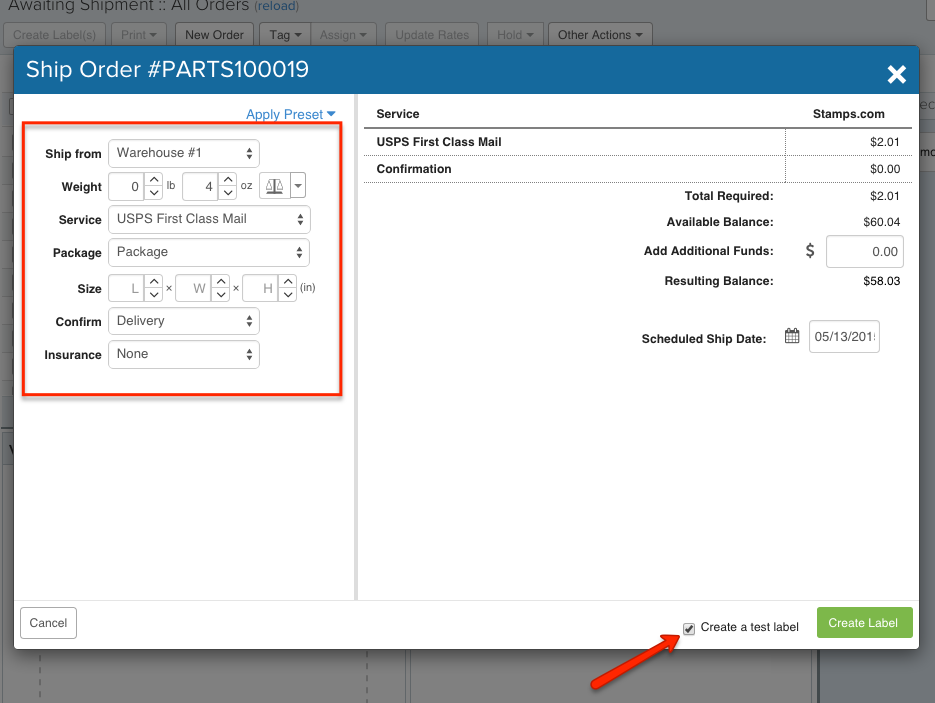
Step numero tres: Create the label. For those USPS services, check the “Create a test label” box at the bottom of the window. For UPS and FedEx, and USPS after that box is checked, click on the green “Create Label” button and voila! Test label! You can print the label, whether a USPS test or a real UPS or FedEx label.
If you used UPS or FedEx, jump over to the Shipments tab and you’ll see the shipment hanging out at the top. At this point, feel free to void the label to make sure you don’t accidentally ship it.
Maria is a multifaceted writer and editor who is passionate about creating content that helps businesses succeed. When she's not writing, Maria can often be found in her garden tending to her plants.