

















































Small BusinessesStart small, think big. Elevate your small-business shipping today.
Start Shipping in MinutesStart shipping instantly with a simple setup. Buy and print labels in minutes with no training needed and no unnecessary steps.
Automate and ScaleSave time with rules that batch, route, and print labels automatically so your shipping keeps up as orders grow.
Save on Every ShipmentAccess exclusive 80% – 90% discounts from every major carrier and cut costs on every label, no matter where you ship.
Connect and CustomizePlug into hundreds of stores, marketplaces, and carriers, or extend ShipStation with custom API integrations built for your business.
Manage Everything in One PlaceManage shipping, inventory, warehouse, tracking, and returns for all your stores and marketplaces in one simple platform.
Simplify ReturnsManage returns in one platform with prepaid labels and self-serve features that keep the process fast and frustration-free.
Mid-size and GrowingShip smarter, grow faster. Scale your fulfillment with ease.
Save on Shipping as you ScaleAutomate rate shopping across 200+ carriers, bring your own carrier accounts, and unlock deep volume discounts that grow with you.
Unlock Shipping InsightsAnalyze sales trends, shipping costs, and delivery times in one platform to identify savings, improve efficiency, and keep fulfillment running smoothly.
Centralize Omnichannel FulfillmentManage orders, shipping, inventory, warehouse operations, tracking, returns, and analytics across online stores and marketplaces with one platform.
Automate Order ManagementCombine AI intelligence with rule-based workflows to speed up fulfillment, streamline operations, and eliminate bottlenecks
Scale With our APIsExtend your setup using our developer-friendly API for custom automated workflows and insights.
Start with Guided OnboardingOur experts walk you through setup, training, and workflows so your team feels confident and ready to ship quickly.
EnterpriseGlobal scale, local precision. Master shipping at every level.
Lower Shipping Costs at Global ScaleReduce global shipping expenses with real-time rate shopping and discounted carrier rates, helping your enterprise control costs and ship efficiently at scale.
International Shipping Made SimpleEasily manage customs forms, duties, taxes, and tracking while accessing global carrier options from one platform built for cross-border shipping.
Fulfillment APIsCustomize workflows at scale with APIs for consolidating orders across channels, comparing shipping rates, validating addresses, tracking, analytics, and more.
Multi-Location FulfillmentManage inventory, orders, and shipping across multiple warehouses and stores with one platform built for multi-location fulfillment.
Advanced Shipping IntelligenceAccess powerful analytics that reveal trends, track spend, and measure performance to unlock global fulfillment efficiencies.
Dedicated Guidance and SupportCount on 24x7 support plus dedicated onboarding guidance so your enterprise shipping runs reliably from day one and beyond.
How Guardian Sports Used Automated Returns to Scale After Going Viral with the NFL
After the NFL adopted their concussion-reducing Guardian Cap, this Atlanta-based sports safety company saw orders explode to 400 per day—and the team’s manual processes couldn’t keep up.
The conclusion is clear: AI is already influencing demand, competition, and delivery performance—and retailers that fail to adapt risk being excluded from AI-led shopping journeys altogether.
We are a 100% web-based shipping software. That means that you can access our platform anywhere, anytime, from any type of computer without needing to download or install anything as long as you've got the Internet and a web browser.
We are a 100% web-based shipping software. That means that you can access our platform anywhere, anytime, from any type of computer without needing to download or install anything as long as you’ve got the Internet and a web browser. But, sometimes (and you know who you are), the tabs in your browser can get a little overwhelming. I know, because I’ve done it myself. I’m in the middle of a project, and all of a sudden, I have two windows with 20 tabs each. It’s an inherent problem that is a side effect of multi-tasking. So, then, you think: What if ShipStation were a native application?
For those of us less techie, a “native application” means that you don’t have to have a web browser to access it. Microsoft Word/Excel, iPhoto, heck, even Google Chrome is a native app. It’s got its own icon in your Start menu or Applications folder, and thus is easily recognizable as that program, and you can’t get it confused with any other program.
Well, here’s a way to do that with ShipStation. The instructions are different for Mac vs PC, so by clicking on the links, you can jump to your specific platform.
ShipStation as a Native App: Mac Version
The best way I’ve found to make ShipStation a native app on a Mac is using a free program called Fluid. It’a super simple way to take any webpage, including ShipStation, and create an icon in your Applications folder. They have a pro version, which is $4.99, that will allow you to do a few extra things like pin your Fluid Apps to the dock.
Now, find Fluid in your Applications folder and open it. Here, you’ll be greeted with a dialog box asking for a bit of information. Enter the URL and name for the ShipStation app like you see below, and click “Create.”
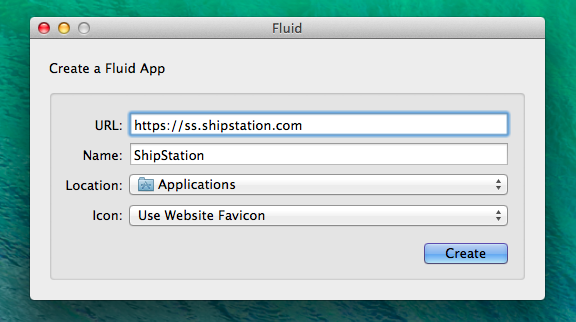
Now, Fluid will take a second to create your application for you, and then you’ll find it in your Applications folder (or wherever you specified in the above picture).
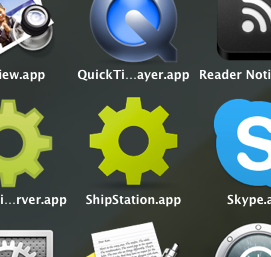
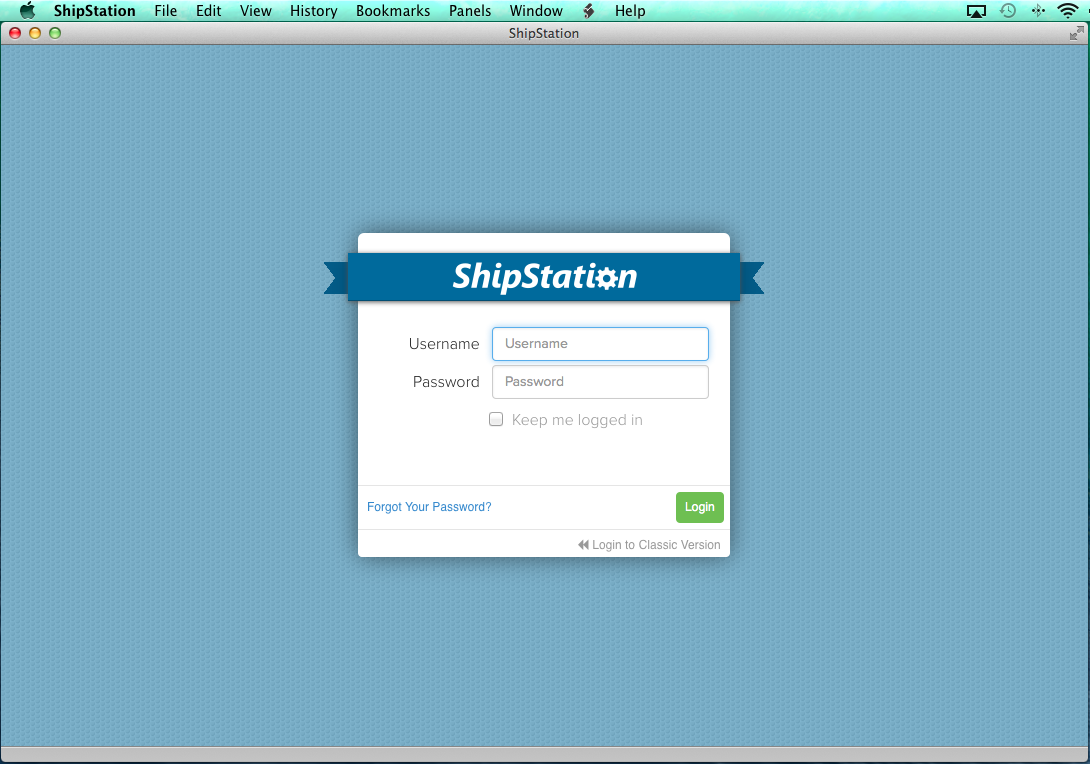
That’s it! You now have ShipStation as a native app on your Mac! Below is a preview of what it looks on my Mac running OSX 10.9 (Mavericks).
ShipStation as a Native App: Windows Version
Luckily, for those of you on a Windows PC, you probably already have the tools to easily make ShipStation seem like a native application on your computer. Hint: it’s our favorite browser… Google Chrome
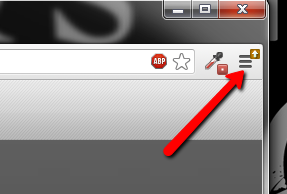
In Google Chrome, first navigate to https://ss.shipstation.com. Now, click on the Tools icon in the top right corner of the window.
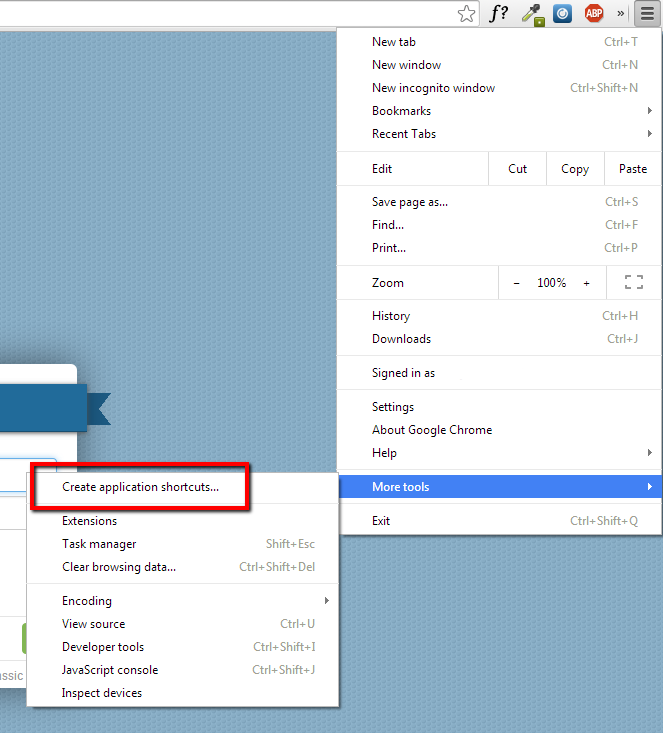
A menu will now pop up. Navigate down to the More Tools option, and then choose the Create application shortcuts menu item.
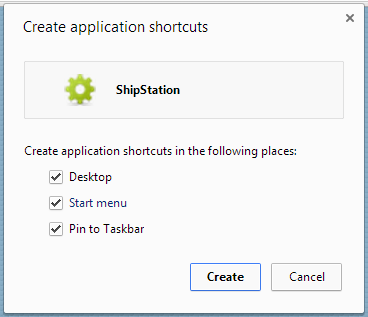
A smaller window will now display asking you where you want to save the shortcut. Select the option(s) you wish to use, and then click Create.
The window or tab in which the login to ShipStation was residing will now be converted to its own menu item and window. Congratulations! You’ve essentially turned our page into a native Windows application!
Maria Fagerland
Maria is a multifaceted writer and editor who is passionate about creating content that helps businesses succeed. When she's not writing, Maria can often be found in her garden tending to her plants.