Back





































Marketplaces
Integrate Acenda With Your Shipping Software
Open the door to bigger marketplace growth. Pair Acenda with ShipStation to turn rising order volume into organized fulfillment, smarter label buying, branded tracking, inventory visibility, and smoother returns as new channels come online.
Key integration features
- Sync Acenda orders faster
- Match SKUs with aliases
- Automate label decisions
- Send branded tracking updates
- Access 200+ carrier integrations
About
Acenda is a marketplace commerce platform for brands and retailers selling across online marketplaces and retail channels. It's known for centralizing product data, creating channel-ready listings, keeping inventory aligned, and routing orders as your catalog grows.
When Acenda helps you expand into more channels, ShipStation gives your team one command center for what happens next. Orders stay organized, labels move faster, and rate shopping helps you control shipping spend without bouncing between systems. Automation cuts clicks per order by 40% and lets teams create up to 15x more labels per hour.
ShipStation also gives Acenda sellers tighter control over complex catalogs. If the same product uses different SKUs across channels, Product Aliases help ShipStation treat them as the same item. That keeps product defaults consistent, supports cleaner inventory workflows, and makes growth easier to manage during every product launch.
Why Acenda users choose ShipStation

Support every product launch

Keep channel growth organized

Strengthen customer updates

Scale on proven shipping power
Move beyond basic shipping tools with ShipStation

Order Management

Inventory Management

Rate Comparison

Fulfillment Automation

Buy and Print Labels

Returns and Exchanges
STEP 1
Update your stock counts in ShipStation before you turn on Inventory Sync. Starting with current inventory levels helps keep your Acenda stock data clean and reduces avoidable sync issues later.
STEP 2
Enable inventory tracking in ShipStation so it can track your starting counts and every restock that follows. ShipStation needs that data in place before Inventory Sync can work correctly.
STEP 3
Link your warehouse to a Ship From Location. That connection is required before ShipStation can use inventory data correctly across your fulfillment workflow and supported selling channels.
STEP 4
Check that your products use exact SKU matches, then connect Acenda as your supported selling channel. ShipStation also supports Product Aliases and Bundles when you need more flexibility across catalogs.
Find the best rate for every shipment
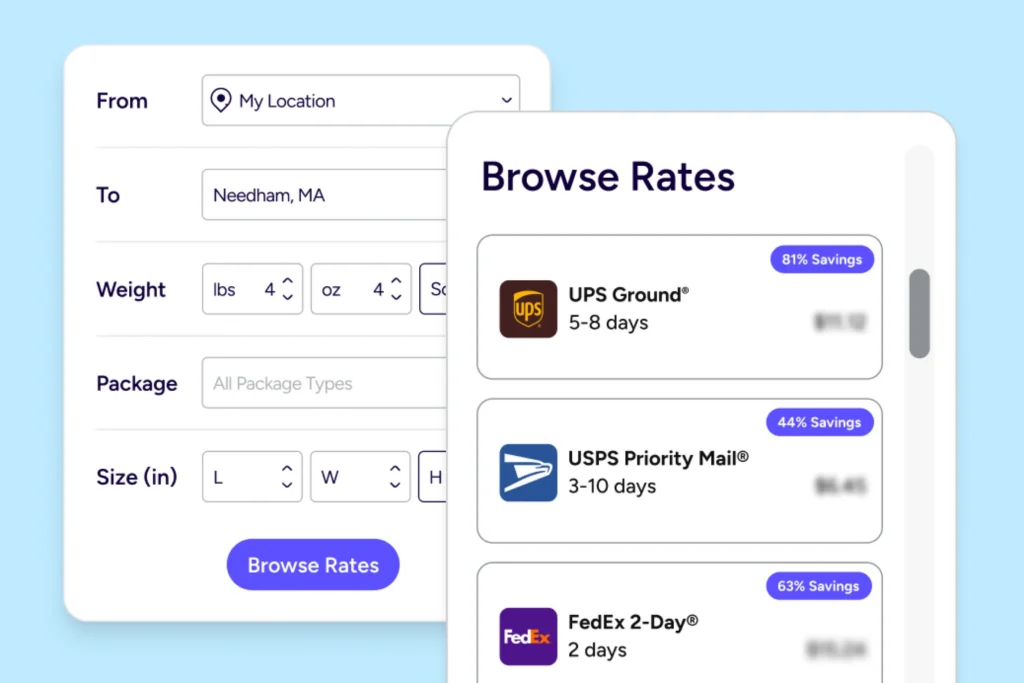
Compare rates, delivery speeds, and services side-by-side for every order that comes in from Shopify, and let ShipStation pick the best option—with up to 90% discounted rates across 200+ carriers.
ShipStation AI
Next-gen shipping intelligence
- SmartFill
- Automated Order Creation
- Universal AI Connect (MCP)
- Batch Label Processing
- Auto-PRO Retrieval
- Dynamic Spot-Pricing Engine
- Packing Recommendations
- 24/7 Always-On
Sign up for a free trial. No credit card required.
FAQ
Acenda and ShipStation FAQ for setup, inventory sync, and marketplace shipping
What is Acenda in this integration?
Here, Acenda refers to the commerce system sellers use to manage product data, listings, inventory, and order flow across marketplaces and retail channels. ShipStation picks up where marketplace expansion creates shipping complexity and gives your team tighter fulfillment control.
How does Acenda work with ShipStation?
Acenda helps brands expand across channels and manage catalog complexity. ShipStation handles the fulfillment side, including label creation, automation, tracking, and returns. Together, they give you a cleaner flow from new listing to shipped order.
Can ShipStation support an Acenda product launch on new marketplaces?
Yes. Acenda can drive new order volume fast, and ShipStation is built to help your team keep pace. Automation cuts clicks per order by 40%, and ShipStation lets teams create up to 15x more labels per hour, so growth doesn’t turn into shipping chaos.
What shipping and tracking tasks can I manage for Acenda orders in ShipStation?
ShipStation gives you one place to manage the post-purchase workflow for Acenda orders, including:
- Buying and printing shipping labels
- Comparing carrier rates and services
- Running batch printing for higher volume days
- Sending branded tracking pages and notifications
- Managing returns and exchanges
That keeps your team focused on fulfillment instead of tool switching.
Does ShipStation support inventory sync for Acenda?
Yes. Acenda is a supported selling channel for Inventory Sync in ShipStation. To sync correctly, ShipStation needs current stock counts, inventory tracking enabled, a warehouse linked to a Ship From Location, and exact SKU matches between products.
How do I set up Acenda inventory sync in ShipStation?
Start with the required setup items inside ShipStation before you enable sync:
- Update ShipStation stock counts to current levels
- Enable inventory tracking in ShipStation
- Link your warehouse to a Ship From Location
- Confirm exact SKU matches and connect Acenda as a supported selling channel
ShipStation also supports Product Aliases and Bundles when your catalog needs extra structure.
Which other channels and carrier options can I manage alongside Acenda?
ShipStation is built for multi-channel growth. You can manage 200+ store and marketplace integrations alongside 200+ global carrier integrations, and ShipStation ships to over 195 countries. That gives Acenda sellers room to grow without rebuilding their fulfillment stack.
Related integrations
Alibaba
Unlock a stronger wholesale fulfillment engine for your business. Pair the Alibaba B2B marketplace with ShipStation to import…
Amazon
Porta i tuoi ordini Amazon in un unico flusso di lavoro. Stampa le etichette, confronta i servizi di…
Amazon
Build a faster, smarter fulfillment engine for every Amazon order you ship. The ShipStation Amazon workflow brings marketplace…