 Back
Back











































Automation Guide
Rules, Not Repetition
11 order fulfillment automation rules every high-volume shop should use to ship easier, faster, and cheaper
INTRODUCTION
How automation rules turn thousands of daily fulfillment decisions into instant, error-free actions
Most high-volume shippers lose time and money in the thousands of small, manual decisions made every day before a package can ship: which carrier to pick, what package dimensions to enter, which warehouse should fulfill an order, whether the address is even deliverable, and a handful of other choices that slow growth.
Each decision takes seconds, but multiplied across hundreds or thousands of daily orders, it adds up to hours of labor, overspending, and a growing list of avoidable errors. The hidden costs of manual order fulfillment show up in the time it takes to manually weigh a package, choose a carrier, and print a label.
And manual work doesn't scale. As volume increases and sales channels expand, it creates even more strain on the business.
Without automation, teams spend more time managing the system than moving orders because the underlying process can't keep up:
Automated order fulfillment closes that gap by transforming fulfillment from something teams manage into something that manages itself. Rules replace repeated manual decisions with logic that applies a set of actions when an order meets certain criteria you define.
Once a rule is set, it applies the same logic every time, instantly and in the background, without anyone touching the order.
Consistency shows up across the entire fulfillment process, such as:




Fulfillment operations get faster and more accurate as it scales, rather than slower and less reliable. That shows up as fewer clicks, consistency at scale, and fewer manual errors—all while creating a better delivery experience for customers. With that context in mind, here are some of the automation rules every high-volume shop should have in place.
Scalability has been proven through us because we went from shipping basically nothing to shipping more paddles than we ever thought possible.
RULE SET
Choose the right option every time
CHOOSE THE RIGHT OPTION EVERY TIME
1. Real-time rate shopping instead of a default carrier
Every shipment is a carrier decision, but many fulfillment teams select the same one every time, either out of habit or because finding and comparing rates takes too much time.
Businesses that rely on a default carrier are missing out on an easy way to save time and cut shipping costs—fulfillment teams spend 10–15 hours on average comparing shipping rates across carrier websites and systems each week when that comparison is done by hand (ShipStation consumer survey, 2026).
Without a system checking in real time, the "best" rate for one order rarely stays the best rate for the next. Package weight, destination, and delivery speed all shift the math, and a fixed carrier can't account for any of it. Rates fluctuate, and service options change constantly, which means a carrier decision made once and left alone quietly goes stale.
Rate shopping closes that gap by comparing live rates from every connected carrier the moment an order imports and automatically picks the right option for each shipment using your rules to balance cost and delivery speed.
The setup itself is simple: build rules based on price, carrier, service type, or delivery speed, then apply them however fits the business—manually for one-off shipments, in bulk, or fully automated across every order.
Real companies. Real automated cost savings.
This works whether a business ships on ShipStation's discounted carrier rates, its own negotiated carrier contracts, or a mix of both. Rate Shopper compares whatever services are actually connected to the account, so a business that's spent years building volume-based pricing with a specific carrier doesn't have to give that up to benefit from automated comparison—the rule simply weighs those negotiated rates against every other connected option and still surfaces the best one for each shipment.
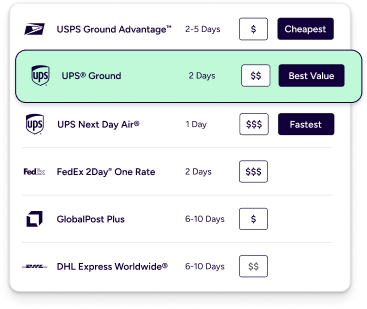
This flexibility means the same rate shopping logic can adapt to different situations without building a separate rule for each one:
Automating the decision doesn't just save time behind the scenes. It shows up directly in what a business spends and how fast it ships:
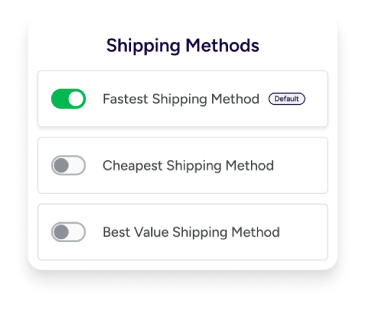
You see the cheapest, fastest, or best-value option pre-selected based on your shipping strategy and business goals. Simply review the choice, print the label, and see your per-shipment costs drop. The impact compounds beyond just cost: teams accelerate fulfillment with fewer clicks, more consistently meet delivery deadlines through smarter carrier selection, and scale with ease, since the decision no longer requires a person to keep pace.
Those cost savings add up over the course of the year and allow us to take and reinvest back into our business for continued growth.
CHOOSE THE RIGHT OPTION EVERY TIME
2. Carrier and service decisions that hold up at scale
Along with making the mistake of sticking with a single carrier instead of shipping with multiple carriers, businesses often pick a specific service and apply it uniformly, regardless of what's actually in the box or where it's headed—a five-pound package to a residential address nearby gets treated the same as a one-pound envelope to a commercial address across the country.
This leaves savings and speed on the table as orders scale, and it takes a person to manually override the default to fix it, order by order.
Automation replaces that default with a single rule that checks multiple criteria at once and automatically applies the right carrier service, such as:
A common setup is straightforward: lighter orders route to USPS Ground Advantage while heavier ones move to Priority Mail or UPS Ground. That logic also extends geographically. A shop might ship every order in the contiguous US via Ground Advantage, but automatically bump anything headed to Alaska or Hawaii up to Priority Mail.
Weight and destination are just the starting criteria. The same rule can layer in package dimensions, store, or tags for even tighter control, so an oversized or store-specific order automatically follows its own path instead of getting lumped in with everything else.
Getting carrier and service selection right isn't just an internal efficiency question. It's directly tied to whether customers stay or leave:
ShipStation Ecommerce Delivery Benchmark Report, 2026
Whatever service the customer picked at checkout gets matched to the actual service the warehouse ships with, instead of a mismatch someone has to catch later.
Carrier and service decisions are some of the most widely adopted automation rules and often the very first automation rules a shop builds. It's for good reason: they touch every single order, regardless of channel, product, or destination. Regardless of volume, getting this layer right creates the foundation the rest of the automation stack is built on.
We were shipping things out very manually, going through every carrier to see which one had the least expensive rates and which was going to get there the fastest. Now we just print a label and ship it out that same day.
RULE SET
Get it right before it ships
GET IT RIGHT BEFORE IT SHIPS
3. Validate every address before printing a label
Before a package can ship correctly, the details behind it need to be correct. Incorrect or incomplete shipping addresses are one of the most common causes of delayed deliveries, returned packages, additional carrier fees, and frustrated customers. Even small errors, such as a missing apartment number or incorrect ZIP code, can prevent a package from reaching its destination.
At scale, manually reviewing every order isn't practical, making address validation essential to reliable fulfillment.
Real companies. Real operational transformation.
Automation reduces these issues by validating recipient addresses against trusted postal databases before creating shipping labels.
For US shipments, addresses are checked against the USPS database, while international shipments are validated using the Melissa address database. For supported countries, addresses can be automatically standardized, flagged, and corrected. Businesses can catch and resolve address issues before they become costly shipping problems.
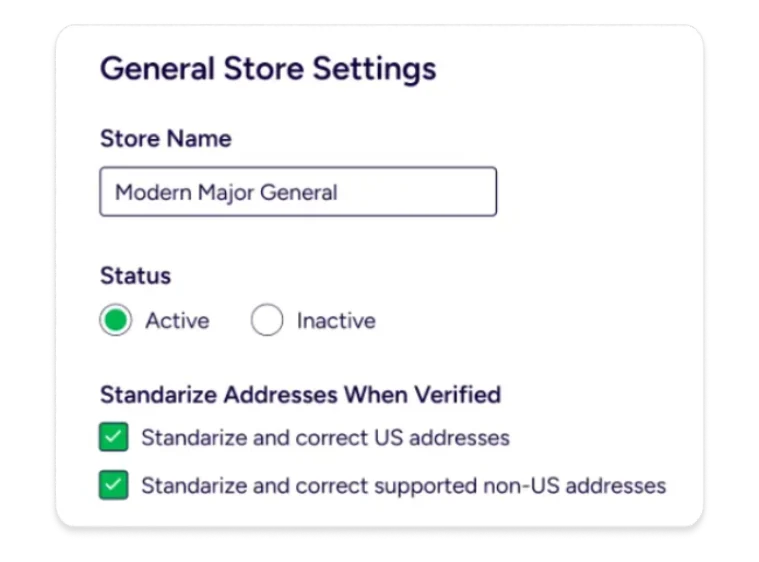
Depending on what the validation check finds, a few different outcomes can happen automatically:
The automation rule creates a smoother shipping operation with fewer failed deliveries, fewer manual corrections, and improved carrier acceptance. By identifying address issues before labels are printed, businesses avoid unnecessary reshipments, reduce correction fees, improve delivery success rates, and provide a better customer experience.
Teams can fulfill orders with greater confidence—protecting operational efficiency and profit margins rather than fixing preventable errors after the fact.
We experienced zero mis-shipments tied to invalid addresses or mishandled orders, which speaks to the reliability of the platform.
GET IT RIGHT BEFORE IT SHIPS
4. Package setup that removes the guesswork
Getting package dimensions wrong is expensive. Any service that uses dimensional weight needs accurate dimensions to calculate the correct rate, and shipping with dimensions smaller than the actual box invites carrier adjustment fees after the fact.
Entering weight and dimensions by hand for every order doesn't scale, which is exactly why setting package dimensions is one of the most-used automation rules.
The right method isn't the same for every business. It depends on how much an operation ships and how consistent those shipments are:
| Method | Best for | Data source |
|---|---|---|
| Product Defaults | Consistent, single-item shipments | Manually set per SKU |
| Preset Groups | Multiple products at once | Applied across records |
| SmartFill | Orders with variation | Learns from past labels |
| Dimensioner | High-volume operations | Reads package directly |
Product Defaults live on the product record itself, so once a SKU's weight, dimensions, and package type are entered a single time, every future order containing that product pulls from it automatically, no re-entry required.
Preset Groups extend the same defaults across multiple product records at once, which is useful for catalogs with many similar SKUs. From there, automation rules can layer in dimensions or added weight based on order-level criteria like item count or tags, so a one-item order and a five-item order aren't treated the same way.
SmartFill takes a different approach entirely. It looks at the two most recent labels purchased for a matching shipment and pulls the weight and dimensions from those, refining its guess a little more accurately with every order that ships.
A common combination of rules pairs Product Defaults with SmartFill: new SKUs get a manually entered starting weight and dimensions, and SmartFill takes over from there, refining the numbers automatically as real shipments come in. This gives a business accurate defaults on day one without waiting for shipping history to build up.
And for operations running high enough volume to justify the hardware, a connected dimensioner like Cubiscan captures a package's exact weight and dimensions the instant it hits the scale, feeding that data in automatically rather than relying on any of the rule-based methods above.
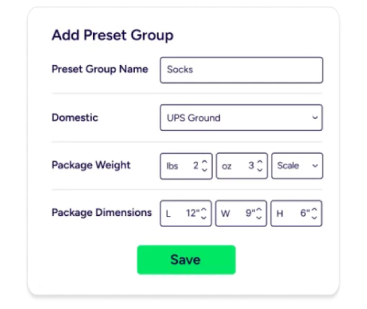
This package data applies the same way regardless of which warehouse ultimately ships the order. Product Defaults and SmartFill are tied to the product record itself, not to a specific location, so a business running Auto-Split or Auto-Routing across multiple warehouses doesn't need to configure package setup separately for each one. Whichever warehouse ends up fulfilling the order, it pulls the same weight and dimension data as any other location would.
Getting package data right from the start helps a business avoid several downstream costs:
Automation eliminated thousands of manual actions per day, freeing our team to focus on production and quality rather than repetitive shipping tasks.
RULE SET
Keep up with volume
KEEP UP WITH VOLUME
5. Fulfillment that finds the optimal path every time
As order volume grows, so does the number of decisions tied to where an order ships from, how many packages it becomes, and whether inventory is actually available to fulfill it. These rules are what let a fulfillment operation absorb that growth without needing more people to manage it.
Manually deciding which warehouse should fulfill an order, and whether it can even ship as a single package, becomes harder the moment a business has more than one location or a product line with any size variation. Add a second location, a growing SKU catalog, or a seasonal inventory spread across facilities, and that decision stops being something a person can reliably make correctly every time.
Scaling Without Breaking
Fulfillment software built for high volume removes that decision entirely by automatically splitting or routing orders based on inventory availability, customer proximity, and shipping requirements. This results in fewer shipments, lower overall shipping costs, and reduced time in transit.
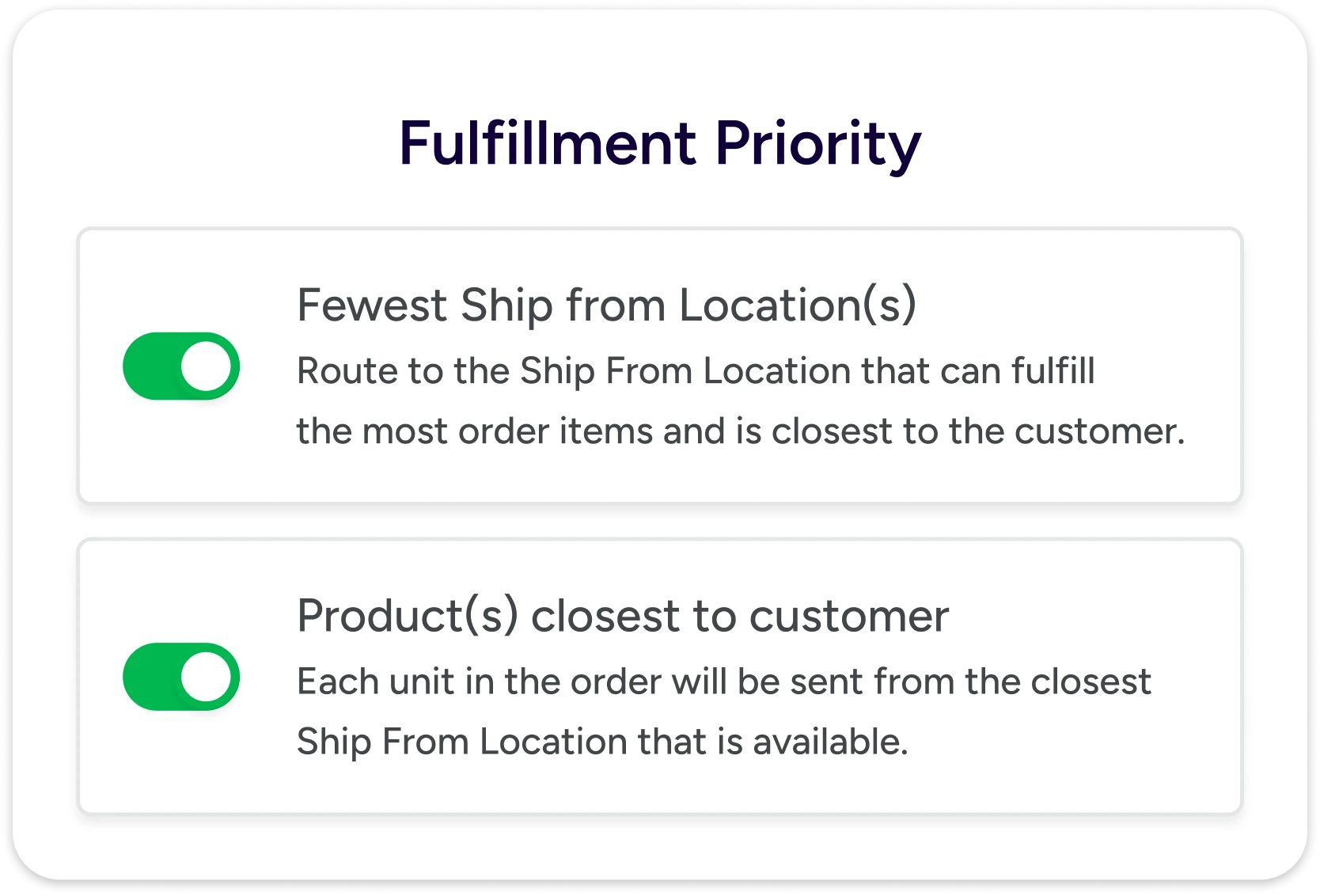
This lets businesses prioritize shipping by proximity, reduce the number of locations required to fulfill an order, and avoid splitting an order unless it's actually necessary.
These routing decisions typically weigh a few factors at once:
Auto-splitting handles the opposite problem: when an order can't ship as a single unit. The automation rule divides it into multiple shipments when items must ship separately due to weight restrictions, different warehouse locations, or partial/backordered fulfillment. This is useful for bulky, awkwardly shaped, or heavy products. Sending two smaller packages is often cheaper and easier to handle in transit than forcing everything into one large box—one of the shipping decisions that quietly drives growth far more than most sellers realize.
Left unautomated, this is exactly the kind of decision that gets made inconsistently under pressure, since the "right" call depends on weight, dimensions, and stock location, all shifting order to order.
The gains compound the moment routing and splitting stop relying on a person to catch every exception by hand:
The impact also compounds at the warehouse level. Companies using warehouse optimization and automation together see reduced labor costs, fewer fulfillment errors, and increased daily order output. At scale, that's the difference between a warehouse that strains under growth and one that absorbs it without adding headcount.
With ShipStation, it was so easy and quick to split the shipments, I don’t know how we operated in the past without it!
KEEP UP WITH VOLUME
6. Shipping at the speed of volume, not one label at a time
Printing labels one shipment at a time stops working when the volume climbs. Someone is still clicking through orders individually and updating statuses one by one, while the pile of unshipped orders keeps growing. It's a problem that tends to surface suddenly rather than gradually—a viral moment, a promotional push, or a seasonal spike can push daily order counts up several times over almost overnight, and a manual process built for the old volume simply can't stretch to cover it.
Printing labels should be the simplest part of fulfillment, not the bottleneck.
Batch processing removes that bottleneck by treating shipping as a bulk operation instead of a shipment-by-shipment task. Orders are pulled in from every connected store and marketplace into a single queue, and shipping labels are generated in bulk from verified order data.
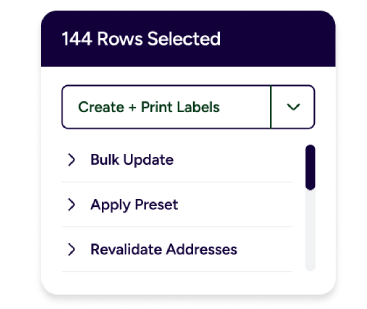
What used to mean opening each order individually, copying customer information, and buying labels one by one becomes a single batch action that covers the whole queue at once, whether the team is running a handful of orders a day or shipping at full peak-season volume.
Status updates move the same way. The system updates shipping statuses for an entire batch in a single pass, rather than requiring someone to touch each order individually. What used to take hours of repetitive clicking becomes a single, automated action applied at scale.
Automating the decision doesn't just save time behind the scenes. It shows up directly in what a business spends and how fast it ships:
This is where software stops being a convenience and becomes infrastructure. Teams can process hundreds or thousands of shipments in batches, keeping fulfillment responsive as demand rises without requiring proportional increases in staff or time.
Tasks that required more effort and resources can now be handled by just one or two people.
KEEP UP WITH VOLUME
7. One inventory, every channel, always accurate
Selling across multiple channels creates a problem that doesn't exist for a single-storefront business. Every sale can affect inventory across multiple marketplaces, making it much harder to keep stock levels accurate everywhere at once.
The more channels a business adds, the faster this problem compounds, since each new marketplace is another place inventory can silently drift out of sync with reality.
That's where costly mistakes begin. Manual inventory updates or disconnected systems make overselling and underselling almost inevitable. You might sell products you no longer have in stock, forcing cancellations and disappointing customers. At the same time, inventory that's sitting on your shelves can be marked as unavailable on another channel, causing you to miss sales nobody even notices.
Inventory syncing solves this by automatically keeping your inventory counts aligned everywhere you sell.
As orders are placed and fulfilled, available inventory is recalculated based on what's currently on hand and what's already committed to open orders. That data is then pushed to connected storefronts and marketplaces such as Amazon, Shopify, Walmart, Etsy, WooCommerce, BigCommerce, TikTok Shop, and more, typically within minutes of an order coming in, rather than at the end of the day.
Real companies. Real operational transformation.
Businesses can even set inventory buffers and sync thresholds to maintain a safety margin, rather than exposing every available unit for sale. That flexibility matters most for products with thin margins or unpredictable demand, where a single oversold unit can mean a refund, a shipping cost, and an unhappy customer all at once.
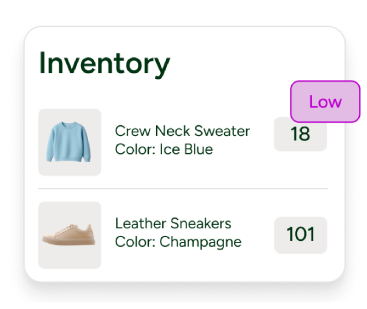
This flexibility matters most in a few specific situations:
Consolidating onto one platform pays off in hours, not just dollars:
The impact goes well beyond avoiding inventory headaches. Automation that keeps inventory accurate protects both revenue and customer loyalty. Businesses can save money by replacing a standalone inventory management system with a consolidated platform while preventing the stockouts that drive customers away.
This is crazy, but I almost rarely go into the order section of Shopify, which is our main ecommerce platform. I just look at everything through the lens of ShipStation because everything is there.
RULE SET
Guide orders down the right path
GUIDE ORDERS DOWN THE RIGHT PATH
8. Smarter tagging, prioritization, and workflow that catches what matters
Not every automation rule is about the shipment itself. Some manage what happens around it—how orders are prioritized internally, what customers are told and when, and what paperwork a package needs to clear customs or come back as a return. These rules round out the fulfillment process from end to end.
Single-item orders are easiest to automate. Multi-product orders open up more possibilities. With several items landing in the same cart, there's more than one way to decide how that order should be handled.
Tags give a rule enough to work with when a single criterion isn't specific enough, making complex cases much more manageable.
A tag can be applied in three ways:
The automation option unlocks real workflow logic. Tags added by an earlier rule can be used as the criteria for a later rule, so rules can be chained together rather than each working in isolation.
A product tagged "Fragile" can trigger a rule that swaps in a custom package type and adds a weight buffer. A tag combination on a multi-item order can trigger a shipping upgrade that a single-tag rule never could. A customer-level VIP tag can trigger a branded packing slip on every order that customer places, indefinitely, without anyone touching it again.
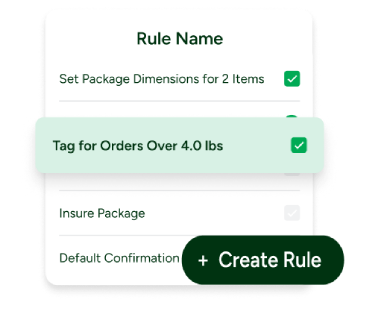
The same tagging logic extends to prioritization and workflow control more broadly. Orders can be automatically:
All can be triggered by criteria as specific as a product, customer, sales channel, or a combination of several.
Order Management ties this together by allowing teams to combine orders across all channels and prioritize the queue using exactly these filters, tags, and stores. The orders that need attention first surface first, rather than getting buried in an undifferentiated list alongside everything else.
It’s helpful to be able to look in one place to see what returns and call tags we have issued. We can see if we have certain customers who request returns more than normal and try to find out what the issue may be.
GUIDE ORDERS DOWN THE RIGHT PATH
9. Trigger automatic customer notifications at fulfillment milestones
Shipping doesn't end when a package leaves the warehouse. Customers still expect to know what's happening to it, and generic carrier tracking pages rarely feel like they're actually part of the brand they bought from. Left unanswered, that gap turns into a flood of "Where is my order?" tickets, pulling support teams away from everything else.
Rules handle this by triggering automatic email notifications at the actual milestones that matter, such as:
Each notification can carry a store's logo and custom colors, link back to a fully branded tracking page, and text customers directly through SMS tracking, so the update feels like it's coming from the business rather than a carrier's generic system.
Automation can take this further by assigning different email templates to orders based on their own criteria, so a VIP order, an international shipment, or a delayed package can each receive messaging suited to that specific situation, rather than a single generic template for everyone.
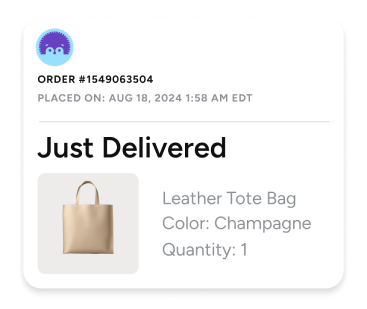
The same milestone logic runs in reverse, alerting the internal team rather than the customer. Automation rules can create an alert or add an internal note the moment an order meets certain criteria, flagging exactly the situations that need a second look without anyone combing through the order queue looking for it.
Taken together, these two notification channels turn fulfillment milestones into two-way signals: customers are automatically kept informed, and the team is pulled in only when something genuinely needs their attention.
None of this is a footnote to the sale. The post-purchase experience is becoming the brand experience in its own right.
Customer satisfaction is up because they automatically receive tracking rather than waiting for us to manually email them.
RULE SET
Handle the complicated stuff with ease
HANDLE THE COMPLICATED STUFF WITH EASE
10. International and compliance without the paperwork headache
Every cross-border shipment needs the same set of details attached before it can clear customs:
Re-entering that information manually on every international order invites two kinds of failure—either a typo that holds a shipment at the border or a step someone forgets under pressure during a busy shipping day. Neither is a small problem. Customs bottlenecks and border delays cost real transit time, and a customer waiting on a stuck package rarely blames the courier.
Automation removes the re-entry entirely by defining these details once, at the product level, so they auto-populate every time that item ships internationally.
Automation rules can apply shipping preferences, add Tax ID numbers, and set customs defaults automatically as new markets get added, while customs declarations, HS codes, and product data are pulled directly into the paperwork rather than typed in by hand.
Real companies. Real operational transformation.
The system can also guarantee the cost of duties and taxes right at label creation, so pricing is transparent for the customer, and there are no surprise fees eating into margin after the fact.
This results in a customs process that scales in the same way as domestic shipping. It's repeatable and predictable, and no longer dependent on anyone remembering every field for every country.
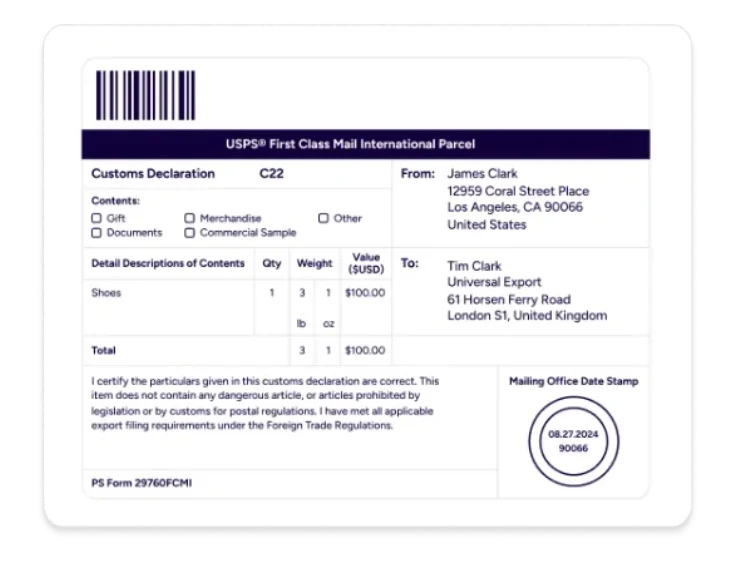
Combined with real-time tracking and proactive customer notifications, this also means fewer delays and far fewer "where's my order?" tickets.
International orders stop being the exception that needs special handling and become just another shipment moving through the same automated system—part of a broader shift where retailers are moving from fragmented tools toward connected shipping networks that make global expansion feel less like a logistics problem and more like a natural extension of the business, where international shipping becomes more predictable, reliable, and manageable.
ShipStation is seamless when it comes to international. We wouldn’t prefer it any other way.
HANDLE THE COMPLICATED STUFF WITH EASE
11. Auto-approve returns and default to exchanges over refunds
What happens after a customer clicks "return" is a real opportunity, not just a cost to absorb. A streamlined returns process can make the difference between lost revenue and retained revenue. Handled well, a return can become a store credit bonus, a same-day exchange, or a second sale instead of a lost one.
Returns management with automation flips the default when a return meets defined criteria (within the return window, an eligible item, or no flags on the order). With rules, the return can be automatically approved upon delivery or scan, and the customer is guided toward an exchange rather than a refund as the first, easiest option.
That can mean:
The same rule can layer in tags to handle exceptions without slowing everything else down—flagging a high-value order for manual review, blocking returns on a specific SKU, or waiving return shipping for a VIP customer—so automation doesn't mean treating every return identically.
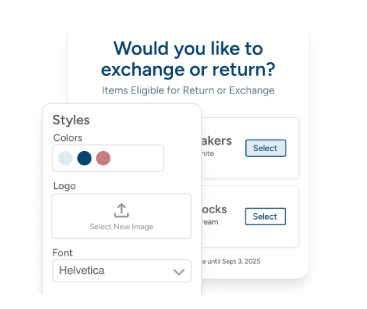
Half of the revenue that would otherwise be lost to refunds can be recovered simply by making exchanges the default path rather than an afterthought offered too late in the process.
The Returns Revolution
Behind the scenes, each return is assigned a Return Merchandise Authorization (RMA) the moment it's created, automatically linking the order, label, and refund or exchange status.
Automating the decision doesn't just save time behind the scenes. It shows up directly in what a business spends and how fast it ships:
ShipStation Breaking Benchmarks Report, 2025
Nothing needs to be reconciled by hand, and because approvals occur through a branded, self-service portal rather than via a support ticket, customers receive a return label within minutes without waiting for a reply.
We've been able to convert refunds into exchanges. ShipStation has enabled us to keep the money in Guardian.
Getting Started
How to implement automation rules in ShipStation
Most rules follow the same basic shape: a set of criteria that describes the order, and an action that tells ShipStation what to do once that order qualifies. Understanding that pattern makes it easier to adapt any of the examples below to a shop's specific catalog, carriers, or sales channels.
The first step in creating an automation rule is understanding what action you want it to perform on an order and defining the order criteria that trigger that action. You can then create rules or edit existing ones within ShipStation under Account Settings > Automation > Automation Rules.
From there, you can view, create, copy, reorder, and delete rules, or reprocess existing rules against orders already sitting in Awaiting Shipment. A guided ShipStation implementation process can help get the first rules running correctly from day one.
Here are a few tactical examples worth building early:
The best automated systems aren't developed at once. Instead, the rules are meant to be built over time. Most shops start with carrier selection and rate shopping, since those touch every single order from day one, then add rules to eliminate repeated clicks and alleviate the biggest pain points. Start with one or two rules, confirm they're working as expected, then layer in others.
To make things even easier, you can leverage ShipStation's automation rules templates, which are pre-built, ready-to-use, and based on common merchant workflows. Using templates, you can quickly set up automation without building rules from scratch, while still customizing key details, like shipping methods, conditions, and quantities.
It is the one single integration that has allowed us to grow so big so quickly. We are five months ahead of our growth goals, and it would be hard to imagine how we would manage this many orders without this integration.
Conclusion
Automation is how growth gets easier
These 11 rules aren't separate fixes. They build on each other. A tag applied by one rule becomes the criterion for the next. An address validated before printing feeds into a batch of labels processed all at once. Inventory synced across channels keeps orders flowing through auto-routing and is accurate in the first place. The real value shows up not in any single rule, but in how cleanly they hand off to one another once they're all running.
Here's what that looks like for one order with the same hand-off repeating for every shipment that follows:
A fragile, oversized item is tagged, adding a sturdier package and weight buffer.
That tag feeds directly into accurate package data at checkout.
The order is routed to the closest warehouse with the item in stock.
The best carrier service selected in real time based on weight and destination.
The label prints and the customer gets an automatic branded confirmation.
No single rule made that happen. Each one simply did its job and passed a cleaner, more complete order to the next—eleven rules functioning less like a checklist and more like a connected decision engine.
That's also what separates a shop that uses one or two of these rules from one that uses all ten. The second business isn't just faster; it's harder to destabilize. A spike in order volume, a new sales channel, a first international order—none of it requires the team to catch up manually, because the system was already built to absorb it. Growth stops being something fulfillment has to keep pace with and becomes something it's already prepared for.
That resilience strengthens the longer the rules run. Every new rule benefits from the ones already in place, since each one narrows down exactly which orders the next rule needs to worry about.
The businesses behind the quotes in this list didn't set out to automate everything. They kept solving the next problem in front of them, and ended up with a fulfillment operation that runs itself.
Related Resources
Rules, Not Repetition
11 order fulfillment automation rules every high-volume shop should use to ship easier, faster, and cheaper.
The Surprising Cost of Manual Order Fulfillment
What you're really spending on manual fulfillment and how to automate your way out of it.

Automation in Action
Inside the automation and smart workflows real brands use to reduce labor costs, minimize errors, deliver reliably, and grow with confidence.

The Ecommerce Delivery Shift
How AI and automation are becoming the decision-making engine behind faster, smarter, more profitable fulfillment.

5 Ecommerce Delivery Myths Busted by Experts
Debunking some of the most stubborn delivery myths via unfiltered, data-backed debate.
ShipStation Ecommerce Delivery Benchmark Report 2026
Data-driven insights on how AI is transforming ecommerce delivery and how retailers can keep pace.
Continue Reading
Rules, Not Repetition
"*" indicates required fields