Back
Back











































 Feature Spotlight


Peak season success comes down to one thing more than any other: whether your warehouse can keep up. Marketing can drive the orders in. But if picking is slow, packing is inconsistent, or nobody notices a bestseller running low until it’s already backordered, that volume turns into refunds, angry emails, and customers who don’t come back for round two.
Warehouse management and inventory management are two different disciplines, but during peak season they live or die together. Get the warehouse floor running smoothly and back it with the inventory visibility to keep it stocked. Then, you’re not just surviving your busiest weeks. You’re setting up the repeat business that comes after them.
Here’s how it usually goes without the right tools. A picker works from a printed list, walking past storage shelves that hold overflow stock nobody should be picking from in the first place, because there’s no way to tell an active pick location from a bulk storage one. An order comes up with an item that’s actually a mismatched count, and there’s no clean way to flag it before it becomes a packing problem downstream. Packing slips are generic, so the unboxing experience looks the same whether a customer spent $20 or $200.
Meanwhile, upstream, nobody’s watching inventory trends closely enough to catch a stockout before it happens so by the time someone notices, the reorder is already late for peak.
ShipStation’s warehouse tools are built around the actual flow of a peak-season pick: knowing where to pick from, catching problems before they become customer-facing, and getting orders packed and branded without slowing down.
Non-pickable locations let you designate certain warehouse locations, differentiating bulk storage, overflow, or reserve stock as off-limits to pickers. That way, your team is never routed to a shelf that isn’t meant to be picked from during a live order. It’s a small setting that prevents a real headache: a picker grabbing from the wrong spot because nothing told them not to.
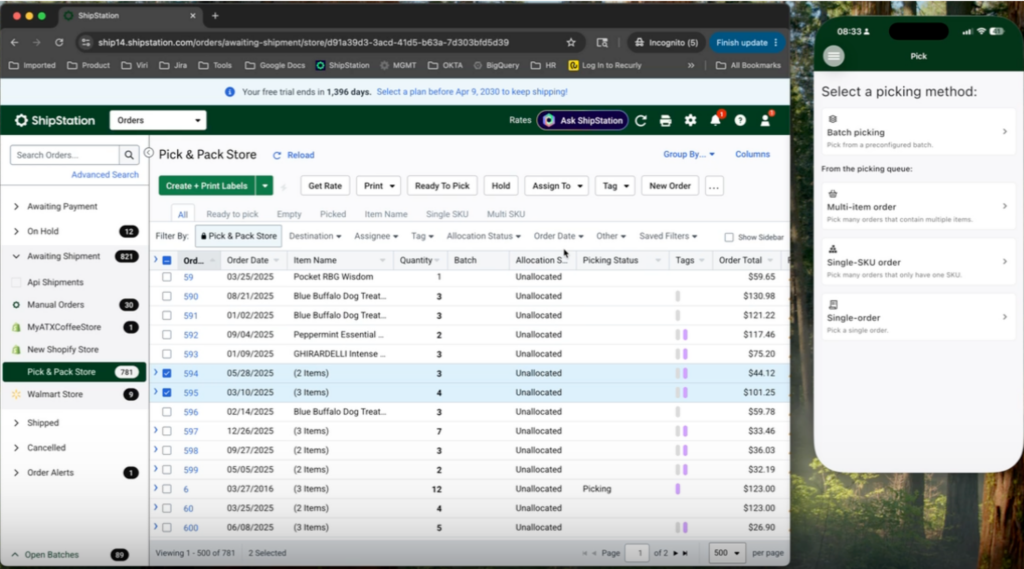
Mobile picking puts the pick list directly on a handheld scanner, replacing the paper list and the memory work with a guided, scan-based flow your team can move through quickly, even as volume climbs.
Pick exceptions give your picker a way to flag a problem such as a missing item, a damaged unit, a count that doesn’t match, right from the pick screen. This ensures the issue surfaces on the order and gets handled before the order ships wrong, rather than after a customer notices.
Pick-to-tote organizes picked items into totes, so your team can batch-pick multiple orders in a single pass across the warehouse instead of walking the floor once per order. This is one of the more direct ways to move more volume with the same team during peak.
Document customization carries that same care through to the box. Build packing slips and other fulfillment documents that reflect your brand using Liquid templating for full control over what shows up on the page. The unboxing experience still feels intentional even when you’re shipping your highest volume of the year.
None of the above works well if the inventory data underneath it is wrong, so a few things are worth a mention:
Getting through peak season is one win. Coming out the other side with the stock and the systems to keep customers coming back is the bigger one.
Analytics gives you visibility into how your warehouse and inventory are actually performing. Not operating on a guess based on gut feel, but a real look at what’s moving, what’s slowing down, and where the next bottleneck is likely to show up.
Reorder assist and inventory forecasting uses that visibility to flag what’s trending toward a stockout based on your actual sales activity. You’re then placing your next order before a bestseller disappears, not after you’ve already lost the sale, and not after a customer who was ready to become a repeat buyer had to go elsewhere instead.
Purchase orders close the loop. Create, send, and track POs tied to your suppliers, then receive them in full or in partial shipments as stock actually arrives using Scan to Receive via mobile or desktop, so the next wave of demand doesn’t catch you flat-footed.
Picture your floor during peak week. A picker’s device routes them only to active pick locations and the non-pickable storage in the back stays out of the flow entirely. They’re batch-picking a wave of orders into totes, moving through volume that would’ve taken twice as long walking it order by order. When something’s off with an item, they flag a pick exception right there instead of packing a problem into a box.
At pack-out, the slip that prints is fully on-brand, built with Liquid templating, so the customer’s unboxing moment doesn’t look like an afterthought just because volume is up. And upstream, analytics, low-stock alerts, and reorder assist already flagged your next bestseller running low so you can send your purchase order out before the shelf goes empty, not after.
Peak season will always be demanding. It doesn’t have to be the season your warehouse falls behind. When picking, packing, and inventory visibility work together in one platform, your team moves faster, your customers get what they ordered, and the experience is good enough to bring them back long after peak is over.
Try ShipStation and see how warehouse and inventory management come together in one place, before your next peak season arrives.