Back








































 Enterprise Business Resources


Choosing the best shipping software at enterprise scale isn’t a feature comparison. It’s an operations decision. Operations, IT, finance, and customer experience all have a stake, and the platform has to work with your carrier contracts, your systems, and hold up during peak shipping season.
The best shipping platform for enterprise is the one your whole organization can run on, under pressure, for years.
This guide shows you how to find it in five steps:
At 200 orders a month, one person picks the software. At 20,000, multiple teams should each have a say.
Start by writing down what each team needs:
| Team | What they’re judging | Question to bring to vendors |
|---|---|---|
| Operations | Speed, error rates, peak reliability | What happens when volume spikes or something fails? |
| IT | Integrations, security, rollout effort | Who builds and maintains our system connections? |
| Finance | Total cost, real savings, invoice visibility | What does the total cost include, and how are savings measured? |
| Customer experience | Tracking, returns, delivery promises | What do our customers see after the label prints? |
Share the table before the first demo. Then score every vendor against the same list.
Enterprise shipping software doesn’t start from scratch. It should work with the contracts, systems, and freight you already have.
If you’ve negotiated carrier rates, the software should use them, not work around them. Ask whether you can connect your own accounts and use them side by side with the vendor’s discounted rates. Either-or means you’re choosing between your savings and theirs.
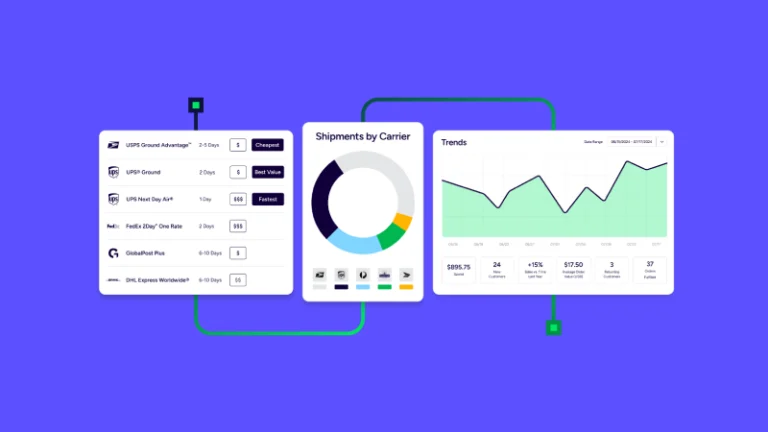
Then check how rate shopping works. Comparing two or three carriers isn’t shopping. It’s browsing. You want real-time comparison across carriers like UPS®, USPS®, FedEx®, and DHL Express, with rules that choose the right service for each order, weighing cost against speed and your delivery promise.
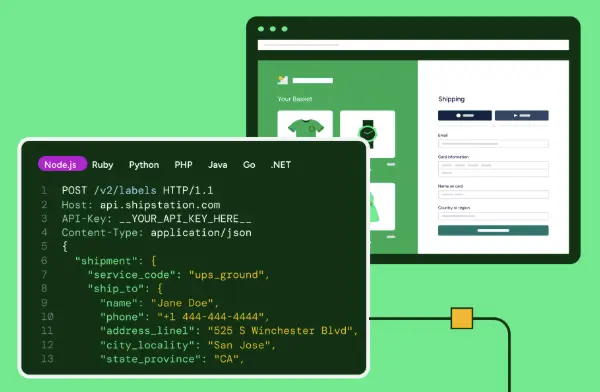
Connecting to a storefront is table stakes. Ask how the platform connects to your ERP, warehouse management system (WMS), and accounting tools. Ask which connections are built-in versus custom, and who maintains them when something changes. A developer-friendly API matters too, so your team can build workflows around your operation instead of reshaping it around the software.
Many enterprise shippers move pallets as well as parcels. When the two live in separate systems, you get two logins, scattered tracking numbers, and no single view of cost. In ShipStation’s 2026 Merchant Insights Report, 78% of merchants said they ship freight, but 58% run it through a separate platform.
Look for parcel and less-than-truckload (LTL) freight in one workflow: side-by-side rates, quote, book, and track in the same dashboard, and your negotiated freight accounts supported.
Freight is also the half of the operation most teams never got around to optimizing. More merchants hand freight to an outside provider than handle it in-house, and with 62% saying high shipping and freight rates limit their growth, stability isn’t the same as growth when freight decisions get made over the phone instead of by rule.
A single platform lets you ask a better question than “which carrier?” It lets you ask whether this is the right mode for the shipment at all. Palletized freight from roughly 150 to 15,000 lbs often belongs in LTL, while a shipment that fits parcel limits can be cheaper there. That mode decision is the first step in freight optimization, followed by carrier fit, shipment prep, and tracking performance over time. In your pilot, run a few shipments that sit right on the parcel-to-pallet line and see how easily the platform compares the two.
Expansion adds a layer most shipping platforms handle badly: customs. Manually building forms for thousands of global shipments is slow and error-prone. Look for software that pulls item details from your product records, generates complete customs documentation, and submits it electronically to carriers, so you define customs information once and it populates every international shipment that includes those items.
Carrier coverage matters just as much. Different carriers excel in different regions, so you want one platform that manages them all, including regional carriers across the U.S., Canada, Australia, New Zealand, the UK, and Europe, without a separate system or process for each.
At small scale, automation saves time. When you’re shipping high volume, shipping automation decides whether you can grow without growing headcount.
The test is simple: after automation, what still needs a person? The answer should be exceptions, not routine orders, and that starts with rules for the decisions your team repeats most: rate shopping, address validation, package setup, routing, and batch printing all run in the background once they’re defined.
The payoff is scale without a matching payroll. An operation shipping 10,000 orders a month can reach 20,000 without doubling its team, and sophisticated workflows can cut labor and processing time by as much as 66%. The goal is an operation that doesn’t hit the usual breaking points as volume climbs, like manual scaling, fragmented systems, and cost creep.
Multiple warehouses mean someone has to decide where each order ships from. Smart routing accounts for inventory, destination, and speed, so you’re not defaulting every order to one site or paying for a split shipment nobody planned. Look for two capabilities working together.
Auto-routing sends each order to the best location based on proximity to the customer and which warehouses stock the items, and it groups products that can ship together from one site.
Auto-splitting divides an order into multiple shipments when items are oversized, too heavy for one box, on backorder, or stored in different locations. Sometimes two smaller packages cost less than one large one, and the software should know that. Add inventory visibility across every location, and your team stops making these calls order by order.
Automation should flag problems before they become delays: address issues, late carriers, spend spikes. Pair that with intelligent reporting you can filter by carrier, service, store, SKU, or warehouse. Broad averages hide problems. Specifics reveal them.
Most enterprise shippers know their total volume and total spend. Few can see cost by carrier, service level, and zone, or on-time rates and transit times by carrier, or where dimensional weight is quietly inflating charges. Ask to see those views in the demo. If your operation runs on an API, ask whether the platform monitors call volumes, response times, and error rates, so you catch degrading performance before it becomes downtime.
The views worth asking for are the ones that make shipping analytics actionable: on-time delivery and first-attempt rates by carrier, transit time variance by lane, and cost per shipment by zone, so you can build a carrier scorecard and bring evidence to your next contract review.
Demos show what a platform can do. A pilot shows what it does with your operation.
Skip the demo data. Run multi-item orders, split shipments, international parcels, and freight through the platform. Edge cases are where integrations and rules break.
Ask how the platform performs during peak periods, and what happens when it doesn’t. If you can, run peak-level volume through the pilot. Peak season is a bad time to find out.
Get clarity on who does what: setup planning, integration work, training, and ongoing support. Ask for response times and terms in writing, and call a reference with a similar volume and setup.
Look beyond the subscription. Count implementation, integration work, the labor the platform removes, and the errors it prevents. Finance will ask, so have the number ready.
Some of the biggest savings are the ones nobody tracks. Overselling, excess stock, reshipping, extra customer service time, and lost customers all trace back to weak address validation, manual workflows, or inventory that isn’t in sync. Put a number on those too. Weak spots like manual workflows and disconnected tools are also where scaling operations tend to break, so put a number on them before you compare vendors.
Many of those hidden costs trace back to gaps in the six capabilities high-volume shippers can’t afford to ignore, so score each vendor against them before you compare price.
Then score every vendor on the same themes: carriers and rates, automation, integrations, multi-location and freight, reliability and support, analytics, and total cost. If two tie, the pilot is your tiebreaker.
That’s what ShipStation is built for. It’s the fulfillment engine built for high-volume shipping, processing 75 million orders a year, with 200+ parcel carrier integrations, 50+ LTL freight carriers, APIs for custom workflows, and support with dedicated onboarding guidance for enterprise customers.
Ready to put it to the test? Start a free trial of ShipStation and enjoy the industry-leading shipping software for enterprise.