




































Small BusinessesStart small, think big. Elevate your small-business shipping today.
Start Shipping in MinutesStart shipping instantly with a simple setup. Buy and print labels in minutes with no training needed and no unnecessary steps.
Automate and ScaleSave time with rules that batch, route, and print labels automatically so your shipping keeps up as orders grow.
Save on Every ShipmentAccess exclusive 80% – 90% discounts from every major carrier and cut costs on every label, no matter where you ship.
Connect and CustomizePlug into hundreds of stores, marketplaces, and carriers, or extend ShipStation with custom API integrations built for your business.
Manage Everything in One PlaceManage shipping, inventory, warehouse, tracking, and returns for all your stores and marketplaces in one simple platform.
Simplify ReturnsManage returns in one platform with prepaid labels and self-serve features that keep the process fast and frustration-free.
Mid-size and GrowingShip smarter, grow faster. Scale your fulfillment with ease.
Save on Shipping as you ScaleAutomate rate shopping across 200+ carriers, bring your own carrier accounts, and unlock deep volume discounts that grow with you.
Unlock Shipping InsightsAnalyze sales trends, shipping costs, and delivery times in one platform to identify savings, improve efficiency, and keep fulfillment running smoothly.
Centralize Omnichannel FulfillmentManage orders, shipping, inventory, warehouse operations, tracking, returns, and analytics across online stores and marketplaces with one platform.
Automate Order ManagementCombine AI intelligence with rule-based workflows to speed up fulfillment, streamline operations, and eliminate bottlenecks
Scale With our APIsExtend your setup using our developer-friendly API for custom automated workflows and insights.
Start with Guided OnboardingOur experts walk you through setup, training, and workflows so your team feels confident and ready to ship quickly.
EnterpriseGlobal scale, local precision. Master shipping at every level.
Lower Shipping Costs at Global ScaleReduce global shipping expenses with real-time rate shopping and discounted carrier rates, helping your enterprise control costs and ship efficiently at scale.
International Shipping Made SimpleEasily manage customs forms, duties, taxes, and tracking while accessing global carrier options from one platform built for cross-border shipping.
Fulfillment APIsCustomize workflows at scale with APIs for consolidating orders across channels, comparing shipping rates, validating addresses, tracking, analytics, and more.
Multi-Location FulfillmentManage inventory, orders, and shipping across multiple warehouses and stores with one platform built for multi-location fulfillment.
Advanced Shipping IntelligenceAccess powerful analytics that reveal trends, track spend, and measure performance to unlock global fulfillment efficiencies.
Dedicated Guidance and SupportCount on 24x7 support plus dedicated onboarding guidance so your enterprise shipping runs reliably from day one and beyond.
How Guardian Sports Used Automated Returns to Scale After Going Viral with the NFL
After the NFL adopted their concussion-reducing Guardian Cap, this Atlanta-based sports safety company saw orders explode to 400 per day—and the team’s manual processes couldn’t keep up.
The conclusion is clear: AI is already influencing demand, competition, and delivery performance—and retailers that fail to adapt risk being excluded from AI-led shopping journeys altogether.
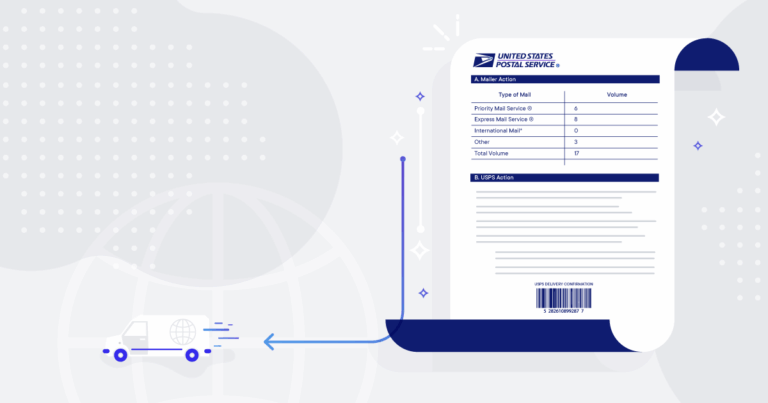
A manifest is a document that is required by some carriers to streamline the pickup process, particularly when shipping out a high-volume of ecommerce orders. It typically contains a barcode that the driver can scan when they arrive to pick up your packages.
Scanning a barcode on a manifest allows the carrier to process many shipments at once.
A manifest is a document that is required by some carriers to streamline the pickup process, particularly when shipping out a high-volume of ecommerce orders. It typically contains a barcode that the driver can scan when they arrive to pick up your packages.
Scanning a barcode on a manifest allows the carrier to process many shipments at once. Without a manifest, the carrier would need to scan each package individually. When picking up thousands of packages from a warehouse, scanning a manifest is far more efficient than scanning each individual package.
While ShipEngine uses the term manifest, some carriers use other terminology for their manifests, such as:
Shipment Confirmation
Shipment manifest
SCAN form
Order Summary
End of Day form
If the carrier you are using requires a manifest, then you must create a manifest every day that you create labels for that carrier. In fact, some carriers, such as USPS, have a hard cutoff time of 12:00 midnight CST, which might catch you off guard if you are operating in another time zone.
How ShipEngine Helps Generate Manifests
Some carriers require manifests in order to bill you. Others simply prefer it as a way to expedite picking up your daily shipments. Check out our docs to see which carriers require manifests. Depending on the carrier, you can also be required to provide different types of manifests, either electronic or physical. Let’s discuss how ShipEngine supports each type of manifest.
Electronic Manifests
Some carriers require electronically submitted manifests. For these carriers, ShipEngine automatically creates and submits your manifests for you. Carriers may require an electronic manifest to be submitted before pickup so that they can better plan for the type of transportation your packages require. The size, weight, and number of packages considerably affects the space requirements for the truck that is sent to pick up your packages.
Physical Manifests
Other carriers require a physical manifest document to be provided to the driver at pickup. For these carriers, you can create your manifest by sending a POST request to the [/v1/manifests] endpoint. The request will [specify the labels to include] in the manifest, and the response will include a URL where you can download the manifest in PDF format. Then all you need to do is print the manifest and present it to the driver at pickup.
Including or Excluding Labels on a Manifest
ShipEngine gives you flexibility in specifying the labels to include in the manifest. You can explicitly specify the labels to include in the manifest or implicitly specify them by indicating the labels you don’t want to include in the manifest.
The ability to filter the labels included in the manifest by carrier, warehouse and ship date, as well as the ability to explicitly specify the labels to include or exclude in the manifest helps avoid including a label in more than one manifest.
Creating Manifests for Large Volumes of Shipments in ShipEngine
Most carriers have a limit of 500 labels per manifest. For this reason, ShipEngine automatically splits the specified labels, or the labels that match the specified criteria, into multiple manifests. The response from the API will include an array of manifests, even if your request results in only one manifest.
You can find out whether or not your carrier requires a manifest, as well as whether or not they support electronically submitted manifests or require a physical manifest document. If your carrier does require a manifest, don’t worry! Our guide on creating a manifest and our code sample on GitHub will get you started.