




































Small BusinessesStart small, think big. Elevate your small-business shipping today.
Start Shipping in MinutesStart shipping instantly with a simple setup. Buy and print labels in minutes with no training needed and no unnecessary steps.
Automate and ScaleSave time with rules that batch, route, and print labels automatically so your shipping keeps up as orders grow.
Save on Every ShipmentAccess exclusive 80% – 90% discounts from every major carrier and cut costs on every label, no matter where you ship.
Connect and CustomizePlug into hundreds of stores, marketplaces, and carriers, or extend ShipStation with custom API integrations built for your business.
Manage Everything in One PlaceManage shipping, inventory, warehouse, tracking, and returns for all your stores and marketplaces in one simple platform.
Simplify ReturnsManage returns in one platform with prepaid labels and self-serve features that keep the process fast and frustration-free.
Mid-size and GrowingShip smarter, grow faster. Scale your fulfillment with ease.
Save on Shipping as you ScaleAutomate rate shopping across 200+ carriers, bring your own carrier accounts, and unlock deep volume discounts that grow with you.
Unlock Shipping InsightsAnalyze sales trends, shipping costs, and delivery times in one platform to identify savings, improve efficiency, and keep fulfillment running smoothly.
Centralize Omnichannel FulfillmentManage orders, shipping, inventory, warehouse operations, tracking, returns, and analytics across online stores and marketplaces with one platform.
Automate Order ManagementCombine AI intelligence with rule-based workflows to speed up fulfillment, streamline operations, and eliminate bottlenecks
Scale With our APIsExtend your setup using our developer-friendly API for custom automated workflows and insights.
Start with Guided OnboardingOur experts walk you through setup, training, and workflows so your team feels confident and ready to ship quickly.
EnterpriseGlobal scale, local precision. Master shipping at every level.
Lower Shipping Costs at Global ScaleReduce global shipping expenses with real-time rate shopping and discounted carrier rates, helping your enterprise control costs and ship efficiently at scale.
International Shipping Made SimpleEasily manage customs forms, duties, taxes, and tracking while accessing global carrier options from one platform built for cross-border shipping.
Fulfillment APIsCustomize workflows at scale with APIs for consolidating orders across channels, comparing shipping rates, validating addresses, tracking, analytics, and more.
Multi-Location FulfillmentManage inventory, orders, and shipping across multiple warehouses and stores with one platform built for multi-location fulfillment.
Advanced Shipping IntelligenceAccess powerful analytics that reveal trends, track spend, and measure performance to unlock global fulfillment efficiencies.
Dedicated Guidance and SupportCount on 24x7 support plus dedicated onboarding guidance so your enterprise shipping runs reliably from day one and beyond.
How Guardian Sports Used Automated Returns to Scale After Going Viral with the NFL
After the NFL adopted their concussion-reducing Guardian Cap, this Atlanta-based sports safety company saw orders explode to 400 per day—and the team’s manual processes couldn’t keep up.
The conclusion is clear: AI is already influencing demand, competition, and delivery performance—and retailers that fail to adapt risk being excluded from AI-led shopping journeys altogether.
Label Printing Made Easy with 3 Interchangeable File Formats
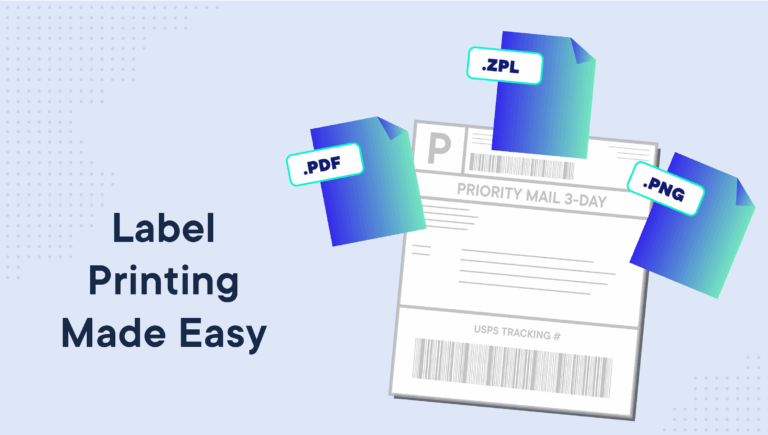
At ShipEngine, it’s our goal to give you everything you need to solve even the simplest shipping logistics issue. That is why we’ve introduced a new feature that allows users—merchants or shoppers (making returns)—to access any label, any courier, any time, in the three most established shipping label file formats: png, zpl and pdf.
What makes interchangeable shipping label file formats so groundbreaking?
There are currently two issues shippers encounter when generating and printing their labels:
1.
At ShipEngine, it’s our goal to give you everything you need to solve even the simplest shipping logistics issue. That is why we’ve introduced a new feature that allows users—merchants or shoppers (making returns)—to access any label, any courier, any time, in the three most established shipping label file formats: png, zpl and pdf.
What makes interchangeable shipping label file formats so groundbreaking?
There are currently two issues shippers encounter when generating and printing their labels:
1. No Easy Way to Convert From Format to Format
If a user preprints return labels in a particular file format, say PNG, to include in the package upon arrival … but then the shopper emails later requesting a new return label that they can easily print as a PDF using their inkjet printer … there are few carriers and platforms that allow you to switch the file format mid-way. The fix to this—up until now—has been for businesses to generate a completely new label from scratch, therefore duplicating their labor and label costs.
2. No One “Right Way” to Generate Labels
Businesses have been unnecessarily restricted by the whims of others, and their preference to include or exclude certain supported shipping label file formats. If you rely on a Zebra thermal printer to accommodate the high volume of labels you print every day, and a certain carrier/WMS/business-management platform doesn’t support zpl shipping labels, you’re likely to have to make a sacrifice somewhere. It may mean extra effort spent printing labels so that you can integrate with preferred carriers, or it could mean limiting yourself to a smaller list of compatible carriers, which can end up being a costly decision.
ShipEngine still stores your generated labels as a pdf by default, but now you have the option to (on the fly and at your convenience) convert your labels into a zpl or png, whether or not the carrier supports this format as well.
Key benefits:
Access more carrier choices—no matter your printer, process, or need
Fewer labels to void and re-create
Choice of formats for shoppers, resulting in fewer support requests
Multi-warehouse accounts no longer need to “agree” on one label format
No need to develop in-house solution or “band-aid” fix
To make your label printing experience as easy as possible, we’ve outlined details on when and why you need each file format:
1. PDF Shipping Label
Adobe’s Portable Document Format, or PDF, is one of the more widely used file formats for shipping labels because of its widespread acceptance by carriers, and compatibility with almost all printer types.
While 4”x6” labels are the standard size for major US carriers, exporting as a PDF gives you the option to print your shipping label on A4 or letter-sized (8.5”x11”) paper. This can come in handy when using an inkjet printer, or shipping to a country that requires different-sized labels.
2. ZPL Shipping Label (Zebra Printer)
Thermal label printers can yield huge savings in terms of ink and time, which is why they’re considered one of the best options for high-volume shippers. However, over time, carriers moved away from offering a .zpl shipping label, leaving shippers to either manually convert their files or give up their printers.
With ShipEngine, it’s easier than ever to print exactly how you want to print.
3. PNG Shipping Label
Known as a Portable Network Graphic (PNG), this raster image file acts much like JPEG. It also happens to be a widely accepted file format for most other direct thermal and thermal transfer printers. If you use a Dymo Labelwriter 4XL to accommodate 4”x6” label printing, this is the format you will need to designate for your API calls.
Streamline Your API with Fewer Calls
We’ve also enabled the ability to add inline requests, creating more opportunity for efficiency within your API. This signals the API to accomplish two calls at once: creating the label, and downloading the label. If you only intend to retrieve labels in a single format, and you know ahead of time which format you will require, then you can optimize your workflow by eliminating the subsequent HTTP request that downloads the label.
This is available to all ShipEngine users, and the setup required can be referenced under “Ways to Download a Label” in our documentation.
If you’re unsure which file format will work best with your printer, the great news is: by default, ShipEngine allows you 90 days to download your labels from the URL provided in each label generation call.
Want to customize shipping labels with your branding?
Now that you can print labels in your preferred file format, why not take an extra step and customize the shipping experience for your customers?
ShipEngine is proud to offer the competitive advantage of being able to help you extend your brand presence throughout the order fulfillment process. With our branded tracking pages, you’re able to promote brand consistency and ultimately enhance the overall customer experience.
If you’re new to ShipEngine and you’d like to check out these features first-hand, we invite you to sign up for your Free API Keytoday and start exploring the capabilities.