Back
Back











































 Shipping Basics


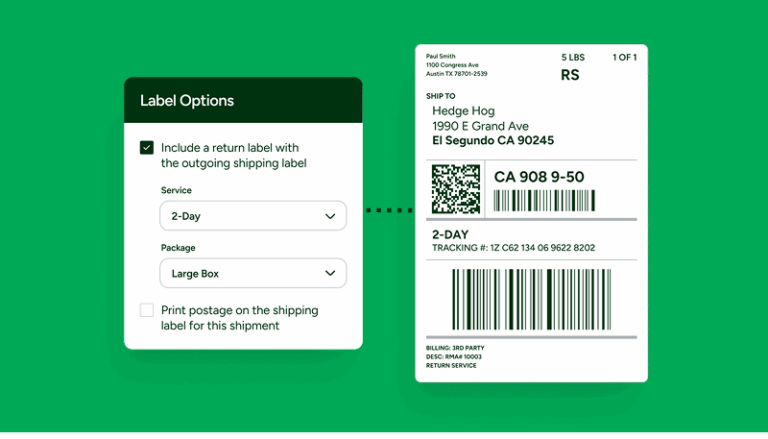
Shipping labels are more than paperwork. They’re contracts between your business, your carriers, and your customers. Every label contains important data: routing details, service levels, costs, and tracking information.
At scale, poor shipping label format creates problems. You get delays, fees, and delivery failures. These issues create risk for your business.
For leadership teams, label standards and automation are key decisions. They affect speed, costs, and growth. Every fulfillment operation makes thousands of choices each day. Which service? Which carrier? Is the address valid? Shipping labels turn those choices into action.
If the label is wrong, the decision doesn’t matter. This is why labels need executive attention. They connect technology, operations, carrier rules, and customer experience.
Carrier label rules exist for good reasons. They support automated systems, help scanners work, and keep packages moving through conveyor belts.
When labels don’t meet standards, problems happen. Wrong size labels fail. Poor contrast fails. Covered barcodes fail. These packages leave automation. They need manual handling. That causes delays, fees, and losses.
At low volume, you can manage this risk. At scale, it becomes a big problem.
The 4 × 6 inch shipping label dimensions are now standard. UPS, USPS, and FedEx all use this size. It works because:
Some companies use different sizes. Often it’s for looks or old systems. But this creates friction at every scan point.
Executives should treat 4 × 6 as required, not optional. Modern shipping platforms like ShipStation create labels in the right format automatically. This removes the risk.
The 4 × 6 format is common. But each carrier has specific rules. The USPS accepts both 4 × 6 and full-page labels.
USPS uses Intelligent Mail barcodes (IMb) for sorting. Bad barcode quality triggers manual processing. This causes delays.
When you create USPS shipping label template formats, check these points:
ShipStation’s USPS integration handles these details. It formats labels correctly, creates proper barcodes, and codes service levels right. This ensures your shipments meet USPS standards every time.
The UPS shipping label template is strict about barcode quality. UPS charges extra fees for bad or reprinted labels. They prefer thermal printing. Why? Thermal labels create better barcode contrast. They last longer.
At high volume, thermal printing becomes essential. Label quality affects how well sorting works.
Key points for UPS shipping label template compliance:
UPS charges fees for reprints and fixes. First-time accuracy matters. Automated label creation through ShipStation with UPS integration helps you meet these needs. It reduces failures and extra charges.
The FedEx shipping label template needs exact barcode placement and service coding. FedEx uses different barcode types for tracking. Label quality affects delivery speed.
Like UPS, FedEx prefers thermal printing. It’s more reliable.
Main FedEx shipping label template requirements:
FedEx also has strict address rules. Automated systems like ShipStation check addresses in real-time. They create FedEx-ready labels with correct coding. This cuts down on delivery problems and address fees.
Printer choice often goes to procurement or IT. This is a mistake. Your label printer setup affects how fast you ship. It affects error rates.
Inkjet, laser, or thermal? Each choice has results beyond the price tag.
Thermal printers work better for bulk shipping labels and high volume:
At low volume, inkjet seems fine. At scale, it slows you down. Thermal printing is standard for professional shipping. ShipStation works with all major thermal printer brands. Setup is automatic.
Knowing how to print shipping labels well takes more than equipment. You need standard processes. You need automation.
Manual label creation has problems. It’s slow. It creates errors. Every manual step is a chance for mistakes. Wrong service level. Bad address. Missing fields.
Small businesses can now print shipping labels at home easily. Cloud platforms changed shipping costs. You don’t need expensive software. You can print from anywhere.
But you need to watch several things:
ShipStation lets you print shipping labels at home with pro-level quality. The platform handles carrier choice, rate shopping, address checks, and label formatting. Home shipping becomes simple.
Manual label creation doesn’t scale. It’s inconsistent. It’s slow. It has errors.
Automated shipping labels fix these issues by standardizing everything:
This consistency helps your team focus on speed, not fixes. Automated shipping labels also reduce the need for expert knowledge. Your operations handle staff changes better.
If you ship hundreds or thousands daily, you need bulk shipping labels tools. Batch processing turns hours of work into minutes.
Modern shipping platforms can:
ShipStation’s batch tools handle bulk shipping labels with enterprise power. The platform processes thousands of labels per hour. It maintains accuracy that manual work can’t match.
Labels do more than route packages. They track costs. Service level, carrier choice, and fees all go in the label.
Errors in address label format hurt your financial reports. They hide true shipping costs. For leaders, accurate labeling helps with:
When address label format is inconsistent, your data is wrong. Automated address tools check every label in real-time. They catch errors before they become failed deliveries.
You need to know label size guidelines for different carriers. The 4 × 6 format is standard. But carriers have specific rules for placement:
Even good labels can fail if placed wrong. Common mistakes include wrapping over edges, taping barcodes, placing on seams, and allowing wrinkles.
Each mistake increases scan failures. Failed scans cause delays and lost packages. People often blame carriers. But the problem starts inside.
Good operations treat label size guidelines as standard procedure. They have training materials, visual guides, and they check quality across all shifts.
Watch for signs that labeling has become a problem:
These signs show reactive management. Many operations hit limits not from demand. They hit limits because labels don’t scale.
Printers fail. Labels misprint. Errors increase. Speed drops during busy times.
Companies that fix labels early grow faster. They train staff easier. They handle peak volume better. This is why labeling should be infrastructure from day one.
Shipping labels get treated as paperwork, but they’re actually the last link in your fulfillment chain—and a weak link breaks everything before it.
Think about carrier choice. Service automation. Rate deals. All of these depend on accurate labels. When labeling is standard and automated, shipping scales well. When it’s not, even the best plans fail.
The right shipping label format strategy brings clear benefits:
Executives should treat labeling like warehouse layout. Like inventory systems. Like staffing. The payoff is fewer failures, lower costs, and confidence at scale.
If your team is still dealing with label reprints, address correction fees, or carrier penalties, you’re not alone. Many growing businesses hit a ceiling because their labeling process can’t keep up.
ShipStation eliminates these costly bottlenecks with automation built for scale:
Join thousands of businesses that have cut their shipping costs and eliminated label errors. Start your free ShipStation trial today and see how proper label automation transforms your fulfillment operation.