 Back
Back










































A Shopify Merchant’s Shipping Guide
A Shopify Merchant’s Shipping Guide


Why Should A Shopify Merchant Choose ShipStation
Shopify offers some of the best tools and features needed to become a world-class merchant. It’s a great platform to sell your products on that doesn’t require a degree in computer science to set up. It’s customizable, has great support, and has an app store with more apps and plugins than you could ever sort through. If you’re looking for a way to sell online—or in-person—Shopify is a great commerce platform that lets you grow and scale your business efficiently.
Merchants selling on Shopify are used to a level of customization, support, and ease. This is why you should consider using a shipping solution like ShipStation. ShipStation gives you shipping functionality with a wide range of features and customization to fit your unique workflow. You can fulfill all of your Shopify or Shopify Plus orders. But you also can ship orders from over 100 other selling channels, marketplaces, order management systems, Enterprise Resource Planning systems, or any other platform you grow to sell or manage your orders on.
As you grow your business to get your products in front of as many customers as possible, you may even start selling on other platforms and growing your business beyond just Shopify. For instance, a lot of merchants sell across a variety of marketplaces like Amazon or eBay too. As you grow, you then may start managing your orders through an order management system like ChannelAdvisor. ShipStation, like Shopify, offers a scalable solution for wherever your business is currently at.
In this guide, we’ll go over how ShipStation makes shipping for Shopify merchants even simpler and more affordable. With import automation features, ShipStation can apply your preferred shipping method to orders without even touching them. You can then print all of your labels in batches of up to 500 orders. Everything is communicated automatically back to Shopify or wherever the order originates and ShipStation will send shipment notifications to the customer. You can cut hours out of your shipping each day, manage a warehouse’s picking and packing workflow, deal with returns, and grow your shipping internationally. ShipStation gives you the tools to scale your fulfillment, letting you focus more time on growing your operations.
ShipStation Features for Shipping Shopify Orders
As your business grows and order volume increases, staying on top of outgoing shipments becomes more time-consuming. When businesses first start out, it’s likely that orders are processed individually—often within the selling channel and/or carrier platform directly.
However, as your operations and fulfillment strategies mature, this moves away from individually processing orders in favor of a larger, holistic approach. This also helps as you start selling on new selling channels and scale your business. As you refine your shipping workflow, it becomes more difficult to keep everything siloed in a carrier interface or within your individual selling channels. Finding a hub to sort, pick, pack, and ship your orders becomes crucial for staying on top of your order volume. This is where platforms like ShipStation help. With discounted shipping rates, automation processes, and other shipping features, you can simplify shipping for Shopify and other selling channels alike.
ShipStation Simplifies Multichannel Shipping
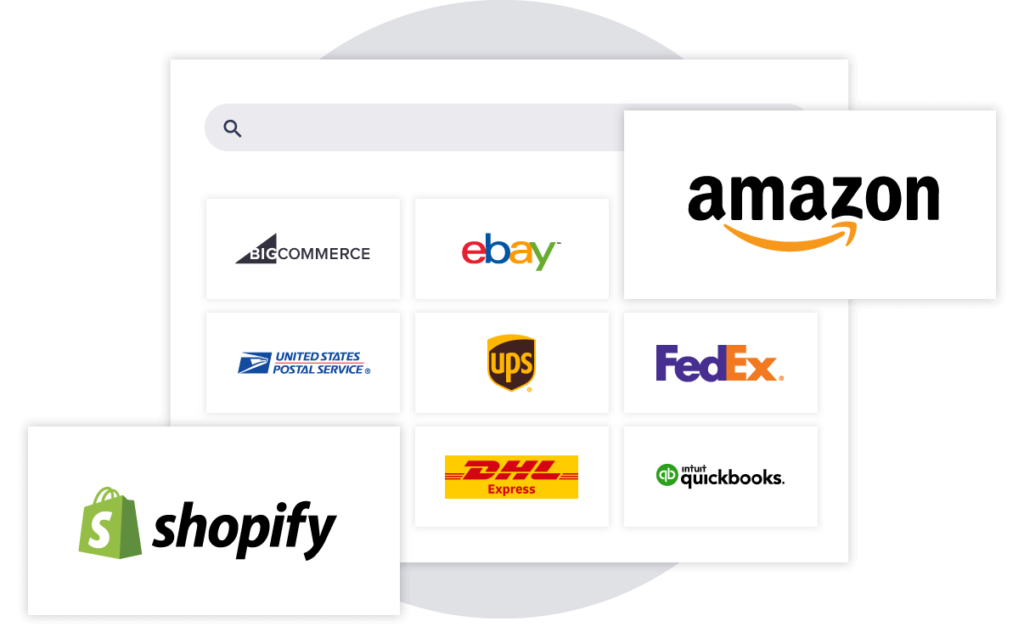
ShipStation is a shipment management system that helps businesses streamline their order fulfillment process to save time and money. By importing all of your orders into one platform, you can easily view, prioritize, and ship all of your orders regardless of where your customer placed the order. In fact, ShipStation integrates with over 100+ other selling channels, marketplaces, hosted carts, Inventory Management Systems, and more. So, as your business continues to scale, ShipStation will continue to simplify your shipping process.
Discounted Shipping Rates
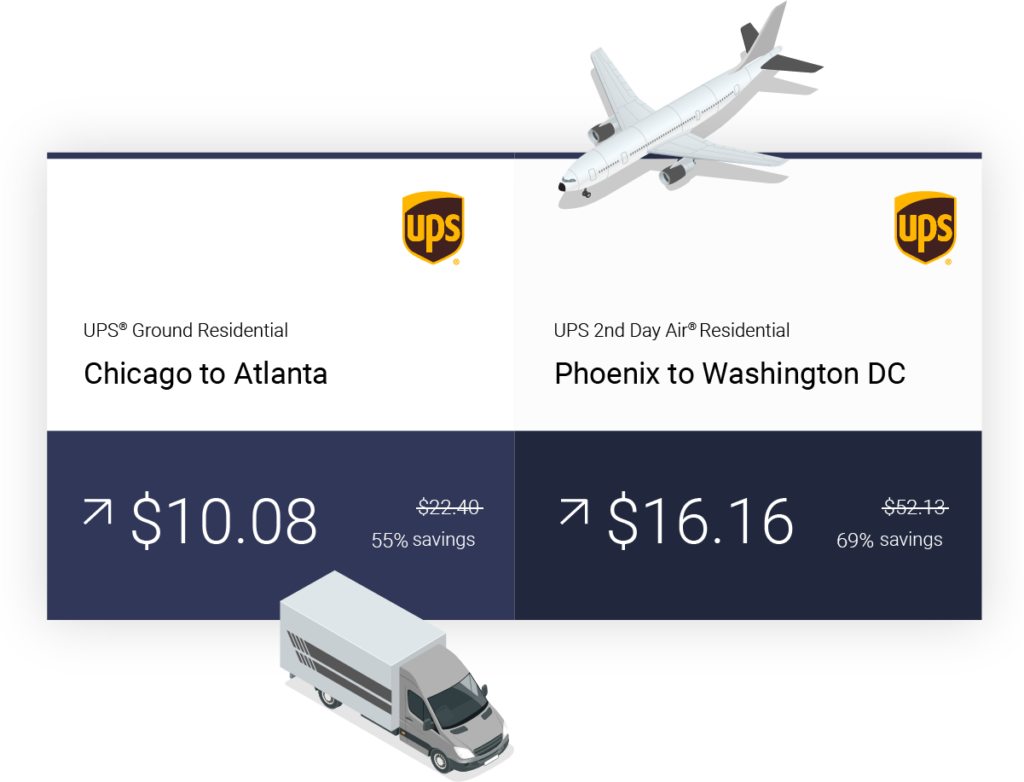
What good is a shipping platform if it doesn’t offer shipping discounts? Luckily, ShipStation offers great carrier rates for ecommerce merchants. With substantial discounts on UPS, USPS, Royal Mail, DHL Express, and more, you can start saving time and money—making shipping simple and affordable. With ShipStation, you can save:
- up to 40% on USPS Priority Mail
- up to 40% on USPS insurance
- up to 77% on UPS Ground
- up to 82% on UPS Daily Rates
- up to 60% on DHL Express international shipments
- and more! (click here to see discounted shipping rates available to CA, UK, and AU merchants)
Check Available USPS Rates With Our USPS Shipping Calculator
Import Automation
One of the key ways ShipStation saves you time is by automatically applying shipping configurations to orders as soon as they import into the system. This is thanks to our automation rules and import automation. For instance, if you know that a customer using your standard shipping option in checkout means “Ship With UPS Ground” then ShipStation can be set up to automatically apply that service to any order shipped with UPS Ground. There are also far more intricate options that you can automate beyond this. You can automatically assign orders to different workers, or send different email notifications on where the order was placed, or even just choose to not import certain orders. You have the freedom and control to use ShipStation the way you want!
Batch Printing
ShipStation’s import automation processes enable a simpler shipping process. This is where batch shipping comes in. In ShipStation, you can select up to 500 orders at a time and generate their shipping labels. In fact, the connection between automation and batching is so powerful that a lot of customers barely even use ShipStation! This includes large brands like Cotopaxi that have ShipStation incorporated into their workflow so well, that they only come into ShipStation, select the orders, and batch ship them. So whether you’re starting out or a household name, ShipStation fits and can grow with you.
Simplify Customer Communication and Returns
ShipStation is largely a behind-the-scenes, backend platform that automates and optimizes the fulfillment process for your business. However, there are a few key ways it simplifies your customers’ order journey beyond just shipping. It also lets you centralize your customer communication for both shipping confirmation emails, delivery confirmation emails, and return shipping.
Customer Communication
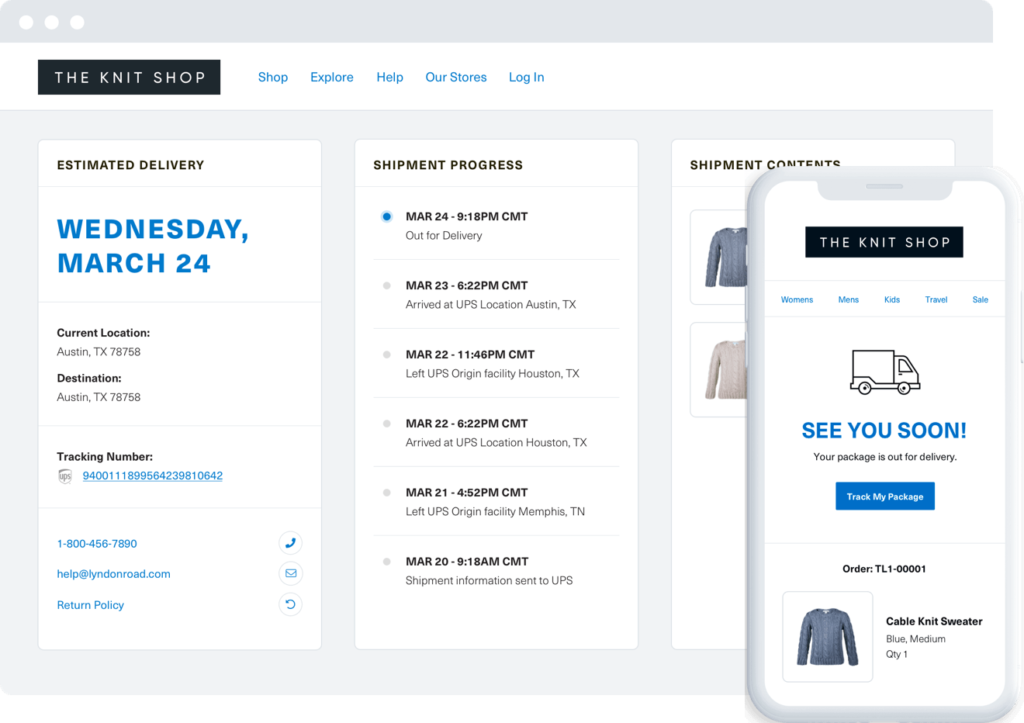
We found that 84% of customers remember delivery most when they think back to ordering online. Since ShipStation shaves off so much from fulfillment time, you can dazzle customers with a great shipping confirmation email. “Wow, that was fast!” they’ll say as they open it. ShipStation’s email template editors allow you to send high-quality emails created with an intuitive WYSIWYG template editor (with available HTML and CSS capabilities). And you can create branded tracking pages that swap out the carrier tracking page for something customized that is more incorporated with your emails. This helps elevate your brand image to your customers and create a more seamless and transparent delivery process.
Returns Shipping
Not only does ShipStation help with warehouse shipping, but it also simplifies return shipping. Customers can initiate their own returns with ShipStation’s returns portal or you can manage them yourself with our returns shipment tracking. Returns don’t have to be complicated. You can manage your returns for Shopify orders or any other platform right within ShipStation to save you and your customers time and money. This also further increases brand loyalty and better reviews with your customers.
How ShipStation Communicates with Shopify and Customers
The main advantage of a shipping platform is that it cuts down on the repetitive nature of manual tasks like copy and pasting order and shipment information between platforms. This not only takes time and takes more work, but it also delays when you can notify customers of their shipment. But, before we get into the nitty-gritty of what all you can do in ShipStation, we need to first explain how ShipStation and Shopify work together and how their relationship benefits you and your customers.
Selling on online marketplaces can be a very strict and heavily regulated process. However, online stores like Shopify let you build out a lot of your own processes. And while Shopify gives you the tools you need to make selling successful, ShipStation helps you stay on top of the shipping side of things—for Shopify and all your other selling channels. So let’s get into how ShipStation streamlines the communication between Shopify and your customers.
- Order placed in Shopify or in a physical store using Shopify POS
- Order is imported into ShipStation
- Order is shipped in ShipStation
- ShipStation sends shipment and tracking information back to Shopify
- ShipStation sends customer shipping confirmation email (if not enabled, Shopify will automatically send notification)
The Shopify and ShipStation Integration
ShipStation connects with Shopify to pass order information to us. Then ShipStation sends back shipment information. At its core, this is how ShipStation communicates with Shopify or your other selling channels. When an order is shipped in ShipStation, we send Shopify the shipping information such as a shipped status and tracking/carrier information. There are a few more advantages to shipping with ShipStation too.
Advantages of ShipStation’s Shopify Integration
View Shopify Inventory in ShipStation
Never worry about printing a label for an order that isn’t in stock. ShipStation lets you view your Shopify items’ stock levels when you’re shipping.
Partially Shipped Orders
If you split a Shopify order into multiple shipments in ShipStation, the shipment notification we send to Shopify will only include the products from that shipped portion order—leaving the unfulfilled order items as unshipped in Shopify until they too are shipped.
Shipping Rates from ShipStation at Checkout
ShipStation offers discounted shipping rates on carriers like USPS, UPS, and DHL Express. In Shopify, you can display these rates—or adjusted versions of them— to your customers at checkout. This allows you to offer adaptive shipping rates that protect your profit margins while also saving your customers money.
How to Import Orders into ShipStation from Shopify
Your orders don’t immediately appear in ShipStation as soon as they are created in Shopify. Instead, these orders sync via a store refresh that occurs either periodically or via a manual sync.
We recommend manually initiating a store refresh whenever you’re ready to ship. Any time you want to see if there are any new orders to ship, simply locate the refresh store section in the upper right-hand corner of ShipStation. You can Update All Stores at once or click the sync icon beside each store. This is also where you’d check to see if there are any errors in the store connection.

From here, you can access your orders on the Orders page. You can ship the orders individually or bulk print labels from the orders grid. When your orders import, you’re ready to start shipping them. Let’s go over some common ways to simplify the shipping process.
How to Ship An Order in ShipStation
Now that your orders have imported into ShipStation, it’s time to ship them. This video below explains how to create a shipping label and reprint it within ShipStation.
What ShipStation Sends to Customers
Apart from in-cart delivery options, much of what ShipStation communicates with customers involves shipment information. Additionally, ShipStation lets you brand your customer communications to match your brand’s unique themes.
In a recent survey of American ecommerce consumers, we found that:
- 84% expect branded confirmation emails to update them of tracking events.
- 67% prefer SMS shipping confirmation notifications
Find out more about what consumers expect from shipping by downloading our Global Pulse Ebook:
Customizable Confirmation Emails
Whether you only send a shipping confirmation or also use delivery confirmation emails, ShipStation lets you create branded email templates that keep your customers in the loop about their package’s delivery timeframe.
Shipment Confirmation Notifications
With ShipStation, you can send a confirmation email to your customers letting them know that a parcel has shipped. You can schedule these notifications to send out based on different criteria.
When ShipStation Can Send a Shipment Confirmation Email:
Upon Label Creation: The default setting in ShipStation is to send the shipment confirmation upon label creation. This automated trigger can be adjusted based on customizable criteria.
When This Shipment First Hits The Mail Stream: This option will notify a customer that a shipment has been created once a carrier scans the label into their system. Please note that this will only be sent out once ShipStation receives the update from the carrier. So there may be a slight delay.
At a Specific Time on the Ship Date: If your carrier picks up your orders at a certain time in the day, you may want to wait until then to update customers that their parcels have been shipped. If this is the case, you can choose the At a Specific Time on the Ship Date option.
Number of Hours Elapsed after Label Creation: Another option would be to simply add a little time after you print the label to update the selling channel and notify the customer.
Delivery Confirmation Notifications
In addition to letting customers know when a parcel has been shipped, you can also notify customers that their parcel has been delivered. This uses the same WYSIWYG email template editor that the shipping confirmation template uses.
Branded Tracking Pages
Instead of linking your shipping confirmation emails to the carrier’s tracking page, ShipStation lets you link your customers to a branded page that includes tracking information, your logo and a color scheme of your choosing, and links to your social media accounts. This is helpful since 77% of customers want to have real-time insight into their package’s delivery.
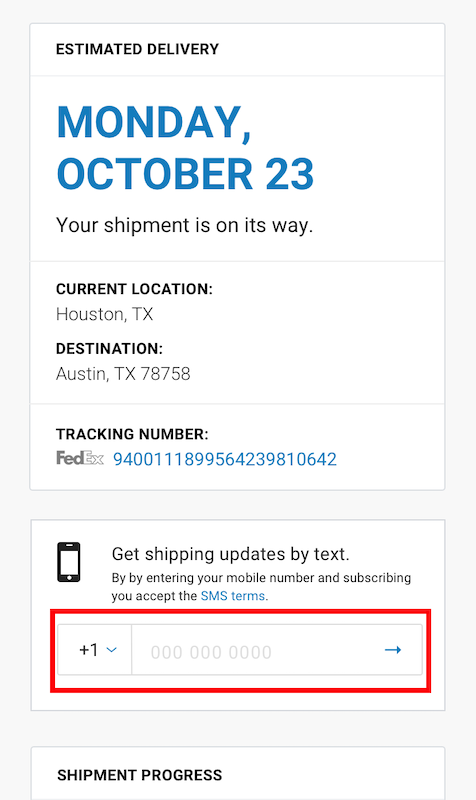
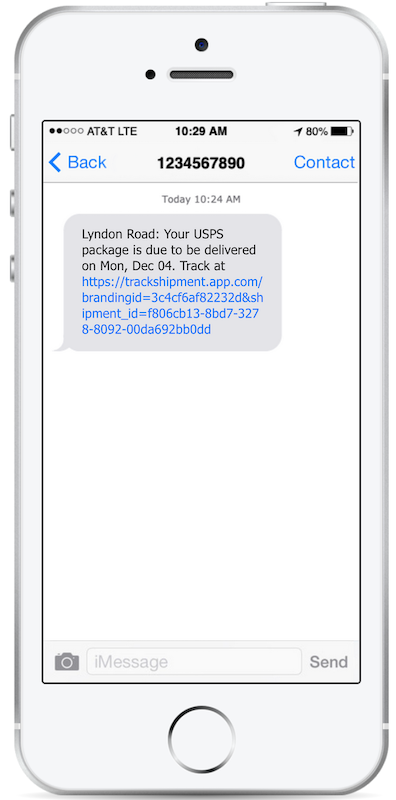
SMS Tracking Notifications
SMS notifications provide customers with timely, relevant shipment information via their preferred communication channel. Perfect for both small and large businesses, branded SMS notifications are a great choice for reaching more of your customer base. Learn how to turn these notifications on for your customers in your ShipStation dashboard.
How to Get Rates, Connect Carriers, and Access Shipping Discounts
Shipping can be affordable if you know what to look for. ShipStation offers merchants discounted shipping rates thanks to our close relationship with carriers. In this section, we’ll go over how shipping costs are calculated and how you can find discounts on carrier services.
How to Calculate Shipping Cost
To ship a parcel, you need to accurately weigh, measure, and apply shipping configurations to a parcel. The hardest part can be choosing the right services. Just because a service looks affordable, doesn’t mean it’s the most affordable. In this section, we’ll go over how to properly calculate shipping costs and determine the best services for different types of orders.
Weight
Weight is a major factor that determines a package’s shipping rate. In order to properly weigh the parcel, you need to wait until it is packaged. You can weigh the parcel at a carrier facility or post office. But buying a postal scale is essential for online businesses. Postal scales are usually very affordable, and unless you’re shipping a very heavy package, most postage scales will work.
Dimensions
Measurements play into shipping rates along with weights. However, the pricing tiers of most services only use weight. Size just adjusts that cost. For instance, if a package is very large or very small this impacts the shipping cost. If a parcel is small and heavy, it may get cubic pricing. However, if a parcel is very large and light, it may be charged based on its dimensional weight (also known as volumetric weight). This effectively makes the size be calculated as a heavier weight that will increase the cost.
Distance
The third component that determines a shipping rate is the distance a parcel travels between the sender and recipient. While we may think of shipping rates in terms of pure distance between zip code and zip code, carriers rely on something called shipping zones. In the US, there are 9 zones—including territories. This lets you easily determine which service to use. As zones increase, rates increase. Sometimes the zone a shipment is going to means switching from a service like USPS Priority Mail in favor of something like UPS Ground.
Delivery Speed
Once you have the weight, size, and recipient information figured out for a parcel, you’re ready to select the shipping service. A shipping service generally bases its rates on these parameters: distance, size, and weight. But now, there is the addition of a fourth element: delivery time. Carrier services generally charge higher rates for express services. And choosing the right one can be difficult since so many carriers offer competing services for standard, express, or next-day services.
Fees & Surcharges
A common component that goes into a rate—especially post-billing carriers like UPS and FedEx—is additional fees and surcharges. With pay-on-creation carriers like USPS, what you pay at the offset is generally the final cost (unless you have an adjustment afterward). However, with post-billing carriers like UPS or FedEx, these fees may not be charged until you get your monthly carrier invoice. Common surcharges and fees include fuel surcharges, residential surcharges, and extended area surcharges. These can change annually or week-to-week depending on the fee.
Connecting Carrier Accounts to ShipStation
ShipStation not only has partners with all the selling channels you sell on, but we also connect to the top carriers. Regardless of if you need to start a new carrier account or connect your existing accounts, you can access discounted shipping rates in ShipStation.
Whether you need to connect USPS, FedEx, UPS, DHL Express, FBA, or many other carriers, ShipStation makes the connection process quick and easy.
How Do I Get Shipping Discounts?
Shipping discounts are crucial for protecting your ecommerce business’s profit margins. Customers expect free and affordable shipping and ShipStation helps you provide that! With a range of options to either access new rates or bring your own rates and carrier accounts over, you and your customers can both be satisfied.
Discounted Rates from ShipStation Carrier Services
ShipStation offers customers a simple way to access discounted shipping rates from USPS (through Stamps.com), UPS, and DHL Express rates through a single postage balance you connect to ShipStation.
USPS Discounts
ShipStation lets you take advantage of USPS discounts on shipments, including First Class, Priority, and Priority Express Mail. More specifically, the discount shipping rates include:
- Up to 40% off Priority Mail
- Up to 18% off First Class Mail Package
- Up to 13% off Priority Mail Express
- Up to 5% off International First Class, Priority Mail, and Priority Mail Express
- Up to 40% off USPS Package Insurance Rates
UPS Discounts
UPS now offers ShipStation users access to ecommerce discounts on domestic and international shipping with UPS. To receive these discounted UPS rates and much more, all you have to do is sign up for ShipStation. Some rate highlights include:
- Up to 82% off Daily Rates
- Up to 77% off UPS® Ground shipments
- Up to 73% off UPS 2nd Day Air®
- Avoid certain carrier surcharges, such as residential surcharges
DHL Express
ShipStation customers who choose to use DHL Express to ship packages internationally can save up to 60% on DHL Express postage. With ShipStation Carrier Services, which is a single postage purchase payment method, merchants can create a new DHL Express account, save on shipping, and use a single postage balance for labels.
Connect an Existing Carrier Account
ShipStation doesn’t require you to use these carrier solutions. You can also connect an existing carrier account for USPS, UPS, DHL Express, and many more. To find out how to connect your existing carrier account, read our connect a carrier help article.
How to Negotiate Discounts
To access discounts from carriers you typically need to reach a certain shipping volume. For instance, USPS can offer full Cubic rates if you ship over 50,000 parcels per year. However, not every negotiation requires such high thresholds. If you have an account manager with your given carriers, reach out and see if there are any discounts you can take advantage of.
Multicarrier Leverage for Discounted Rates
A common negotiation tactic for merchants with growing shipping volume is to diversify which carriers you use. For instance, if you predominantly use UPS, use more FedEx options for certain orders. To get you to use their services more, the carrier may begin offering discounts to incentivize their service. Common discounts include things like fuel and residential surcharge discounts or waived fees. Keep in mind that these discounts are usually reserved for high-volume shippers. So, until you can negotiate better rates with carriers, the discounts offered through ShipStation may be your best bet.
How to Ship Shopify Orders
Whether you use checkout options like Free Shipping or something more dynamic like Shopify Shipping Profiles or In-Cart Delivery Options, you need to figure out which shipping options work best for your different orders. In this section, we’ll go over different shipping options that you may offer in Shopify. We’ll also discuss different add-ons like shipping insurance and packaging.
How to Offer Free Shipping
Free shipping is the preferred shipping option. As larger retailers and marketplaces begin offering this for more customers, it begins being demanded of smaller merchants too. In fact, over 50% of customers expect shipping to be free.
Generally speaking, you want shipping to be no more than about 10-20% of your profit margins. There are a number of ways to learn the cheapest way to ship a package, but a good way to offset free shipping costs is to incorporate shipping costs into the item cost. This is a common practice for merchants selling on marketplaces that require merchants to offer free shipping. And it also works well on your own online store. However, if you inject too much cost into the item price, you run the risk of losing the customer to shopping around elsewhere.
Typically free shipping is reserved for lightweight items with high-profit margins. It may even be used on a per-item basis. This is a good use case for using a Shopify Shipping Profile.
How to Offer Minimum Purchase Threshold
Free shipping at a minimum purchase threshold is a great way to encourage customers to spend a little bit more money to get free shipping. Food delivery services like Grubhub are a great example of this model. Free delivery is a reserved minimum cost of about $12.00. You may not want an order of eggrolls, but a customer is more likely to spend $4 on an appetizer with their $11 entree instead of spending $3 on shipping. Using this principle can be a good way of getting customers to spend a little more from your site to drive up your profit margin while also getting the cart conversion.
How to Offer Flat-Rate Shipping
Flat-rate shipping is a common option for most retailers. Customers don’t like surprises at checkout. That can lead to cart abandonment. If you need to charge for shipping, try and offer flat-rate shipping.
Let Your Customer Choose Their Shipping
Because ShipStation offers discounted shipping rates on carriers like USPS, UPS, and DHL Express, you may want to pass these savings onto your customers. In Shopify, you can display rates from these—or adjusted versions of them— to your customers at checkout. This allows you to have responsive shipping rates that can both protect your profit margins while also giving your customers greater shipping options and saving them money.
How to Offer Shipping Insurance
Shipping insurance is a way to cover damage or loss of a parcel during transport. Things like order defect rates and lost parcels can impact profit margins far more than the cost of shipping insurance because, luckily, shipping insurance is not very expensive. However, there are things to remember about shipping insurance. Not everything you think will be protected actually is.
Providing Insurance as a Checkout Option
If you want to pass the cost of shipping insurance onto the customer, typically it is offered as an item option at checkout. Shopify has a great insurance guide to help set this up. To set this up in ShipStation, you simply need to apply the insurance option prior to generating a label. To avoid forgetting this, applying insurance and other add-ons can be automated in ShipStation. A common example of automating insurance is to apply it to any order with a total order cost exceeding $50 since this is the amount that is covered by USPS Priority Mail. You can learn more about the insured value covered by different carrier services.
Should I Use Carrier Insurance or Third-Party Insurance to Cover Parcels?
Deciding which insurance to use comes down to coverage and pricing options. Typically, carrier insurance costs between $0.75-0.85 per $100 value, with a base cost of roughly $2.50. However, third-party insurance like Shipsurance doesn’t have the minimum base rate. So you only pay the rate per $100. So, it can save you substantial amounts of money if you use insurance a lot. However, different providers have more coverage than others. For instance, some policies don’t cover a parcel if it includes branding on the packaging. There are also different restrictions based on destination. If you ship to Russia, for instance, there is the chance that damages occurring in Russia are not covered. However, insurance can be applied but it is only covered up until it leaves a country that has coverage. So it would only be covered up to the point it is put on the plane. Just be sure to read your provider’s terms and conditions prior to purchasing insurance for your orders to make sure everything is covered.
Packaging Tips for Shipments
Shipping boxes help protect your items, but they also add weight to your shipment. Most shipping carriers charge based on the size and weight of a package, so it’s more cost-effective to keep your packaging as small and lightweight as possible. If you have different sizes of items, you may want to keep a few box sizes on hand. A good rule of thumb is that a box should always have 1.5 – 2″ on all sides, in order to protect the item and make the item eligible for insurance if needed. In addition, make sure to leave at least 2″ on top of the height of your object. Using a box that’s similar in size to your item(s) will also save you money by eliminating the need for excess package fillers.
Where to Get Shipping Boxes
There are two routes to take for getting your shipping supplies affordably. One option is to get your supplies in bulk. Websites like Uline.com or customizable packaging from Noissue are common ways that ecommerce companies get their boxes, tape, and other shipping supplies.
Another way that companies get boxes is to use free packaging provided by carriers like USPS. Most free shipping boxes, however, are flat rate boxes. Keep in mind that these boxes can only be used for the Priority Mail service advertised on them. If you use the packaging for a different service, you will likely be charged a cost adjustment.
The Cheapest Way to Ship Shopify Orders
ShipStation saves merchants money in a lot of ways. By saving time on shipping, you don’t have to worry about overtime shipping or hiring more people. After all, time is money. However, as much as time is money, money is money. Finding the cheapest way to ship a package doesn’t have to mean using the slowest service. There are plenty of options available that fit the right package. As mentioned in previous sections, there are many factors that go into any shipping rate. Sometimes, rates increase based on the ship-to zone more than they do by weight. This can influence which service you decide to use for a given order. In this section, we’ll go over when some services are better than others.
Which Shipping Services Are Most Affordable
Here, we’ll go over when certain services can be more favorable than others. Based on factors like weight, distance, size, and speed, the cheapest shipping option can change. Knowing which service to use can save you a lot of money on shipping costs.
Best Options Based on Size
Generally, the USPS offers the lowest rates for small packages. Regardless of if you’re shipping First Class Mail, Media Mail, Priority Mail Package, or Flat Rate, smaller parcels work better with USPS in the same way that larger parcels work best with UPS or FedEx.
There are even additional savings for small, heavy items. This is referred to as Cubic pricing.
USPS Cubic
USPS Priority Mail offers the lowest rates on cubic pricing. This is a special service that allows you to ship small, heavy items at a lower shipping rate through the USPS. For items weighing less than 20 lbs, this is the formula for how to find their cubic feet:
Cubic Formula:
Length x Width x Height / 1728 = Cubic Feet
Cubic pricing is broken into 5 categories, ranging from 0.1 to 0.5 cubic feet.
Best Dimensional Weight Pricing
The opposite of cubic pricing, though is dimensional weight pricing. Dimensional weight increases the shipping rate if a parcel is considered too large compared to its weight. Since packages take up space in carrier trucks, their shipping rate increases with their size. The way it works is you multiply the parcel’s dimensions (LxWxH) by a divisor.
Dimensional Weight Formula:
L x W x H
Divisor
The larger the divisor, the cheaper the parcel. USPS has the lowest rate when it comes to dimensional weight pricing:
| Carrier | Domestic Dimensional Formula |
| UPS | (L x W x H)/ 139 |
| FedEx | (L x W x H)/ 139 |
| USPS | (L x W x H)/ 166 |
Cheapest Shipping Options By Weight
Best Option Under 16 oz
USPS First Class Mail is usually your best bet for parcels weighing less than 1lb. Even though First Class Mail recently slowed its delivery speed, it is still a very effective and affordable shipping option for lightweight parcels.
Best Options for Parcels between 1-5 lbs
USPS Priority Mail is a good option in this weight range. However, you can find services like UPS Ground working well once you start reaching the heavier end of this scale. Additionally, you could look into hybrid services from FedEx and UPS. These are partnerships between either FedEx or UPS and USPS. Since USPS has such a good delivery network (they have to be able to deliver to every US address) they make the final delivery for UPS or FedEx. These services include UPS SurePost, UPS Mail Innovations, and FedEx Ground Economy. These services are affordable, economical, and supported within ShipStation. Keep in mind, though, that a lot of times you have to have them enabled by FedEx or UPS. So you would need to reach out to them to find out which options are available to you.
Best Option for Heavier Parcels (Over 5 lbs)
USPS can be good for some local shipments weighing up to 5-9 lbs. However, as the destination starts going further away from the ship from address, UPS becomes more affordable. UPS Ground and FedEx Ground offer affordable shipping options for your heavier parcels. Since they were founded as a parcel courier—it’s even in their name—they have always done a good job of offering affordable parcel delivery. And with ShipStation, you can save up to 82% on UPS shipments.
What gets there the fastest?
Best options for 2-day
When using express delivery services, you want to use something with a delivery guarantee. It is important to note that USPS offers no services with guaranteed 2-day delivery. So any parcels that require a hard 2-day delivery work best through something like FedEx 2 Day or UPS 2nd Day.
Best options for Next Day
FedEx tends to offer affordable express shipping options. That is true for next-day services too. FedEx Standard Overnight® is generally the preferred express shipping option for most parcels. But UPS Next Day Air Saver® is another good option if you prefer UPS.
Best options for Next day AM
Similar to Next Day Shipping options, FedEx and UPS offer guaranteed delivery by noon the following day. The best available services are:
- FedEx Priority Overnight® (by noon)
- FedEx First Overnight® (by 10:00 am)
- UPS Next Day Air® (by noon)
- UPS Next Day Air® Early (by 10:00 am)
How to Master Return Shipping
Return shipping is a necessary evil. No one—not the retailer nor customer—wants to deal with returns. Well, carriers may like them. But that’s about it! However, mastering returns allows you to increase your cart conversion. In fact, we found that 90% of customers expect merchants to offer “simple returns.”
Pay-on-Use vs Prepaid Returns
Knowing which type of return labels different carriers offers is important to saving you money. If you use USPS, chances are that you pay for returns at the time of label creation. However, UPS and FedEx are pay-on-use returns. This means that you don’t have to pay for the label until you use it and the carrier scans the parcel into their system.
Which Return Services Are Most Affordable?
Generally speaking, return services cost the same as outbound shipping services. But, since there is less urgency to receive returned packages. So, return services tend to favor the slower options like First Class Mail or whichever service can deliver most affordably. To find out the most efficient ways to process and receive returns, jump ahead to this section.
How to Ship Internationally, Affordably
For parcels weighing under 4 lbs, First Class Mail International is a very economical way to ship internationally. However, there are no requirements for estimated delivery time on this, so it may take weeks or sometimes months to reach its final destination. For parcels weighing 4 lbs and over, USPS Priority Mail International typically offers the best rates from USPS. But UPS, DHL, and FedEx also offer great options for international shipping.
Best Options for Quicker International Delivery
For most parcels, USPS Priority Mail Express International typically offers the best shipping rates. if you need to use expedited international shipping options, FedEx International Priority® offers quick delivery timeframes. However, UPS Worldwide Express® also offers affordable express options. Additionally, DHL Express available through ShipStation One Balance gives you access to affordable, express delivery for international orders.
Importing Orders and Import Automations
So far, we’ve gone over how Shopify and ShipStation integrate with each other and how to connect carriers. Now, it’s time to learn how ShipStation can automatically apply shipping configurations to your orders when they import. This can save you a great deal of time and avoids a lot of common errors associated with manual entry. If you know which shipping service to use for an order just by looking at it, there’s not a reason to manually apply it. If there are conditions that can change that shipping service, those can be automated too. Finding ways to minimize the amount of time you spend shipping allows you to focus on business sectors that require more attention. While shipping is important, it’s not the most important part of your business. In this section, we’ll go over how automation makes shipping even simpler.
How to Set Up Shipping Import Automation in ShipStation
You don’t have to select the carrier and shipping service each time you want to ship an order in ShipStation. You can configure shipping parameters to automatically apply to your orders as soon as they import into ShipStation. The video below introduces and explains concepts like product defaults, product preset groups, service mapping, and automation rules. Setting these up may take a little time, but once you configure these settings, you’ll save tons of time on shipping.
Product Defaults and Product Preset Groups
When ShipStation automatically applies shipping services and other configurations to orders, the first thing it looks for are product defaults. These are configured on the product level in ShipStation. Product defaults allow you to apply product-specific shipping configurations to an order. You can configure for both domestic and international services on each of your product’s product defaults.
For instance, if you always ship a specific shirt out with USPS First Class Mail Thick Envelope, and it always weighs 6 oz, you can add that information to ShipStation’s product record. If you have multiple items that all fit the same size, weight, and dimensions, you can create a Product Preset Group to quickly apply this to multiple product records.
These will only apply the shipping configurations to an order if it is a single-item, single-quantity order. If you have multiple quantities of the item, or other items in the order, you would need to automate the shipping service based on an order-level setting. This is where service mappings and automation rules come in.
Service Mapping
Service mappings reflect the shipping service you or the customer choose for their order at checkout. So if you set up a Shipping Profile in Shopify you can map the corresponding service within ShipStation.
For example, if you set up “Free” as a shipping option in Shopify and a customer selected it, this would import along with the order in ShipStation and be listed as the requested service. From here you could configure ShipStation to always apply First Class Mail to these orders.
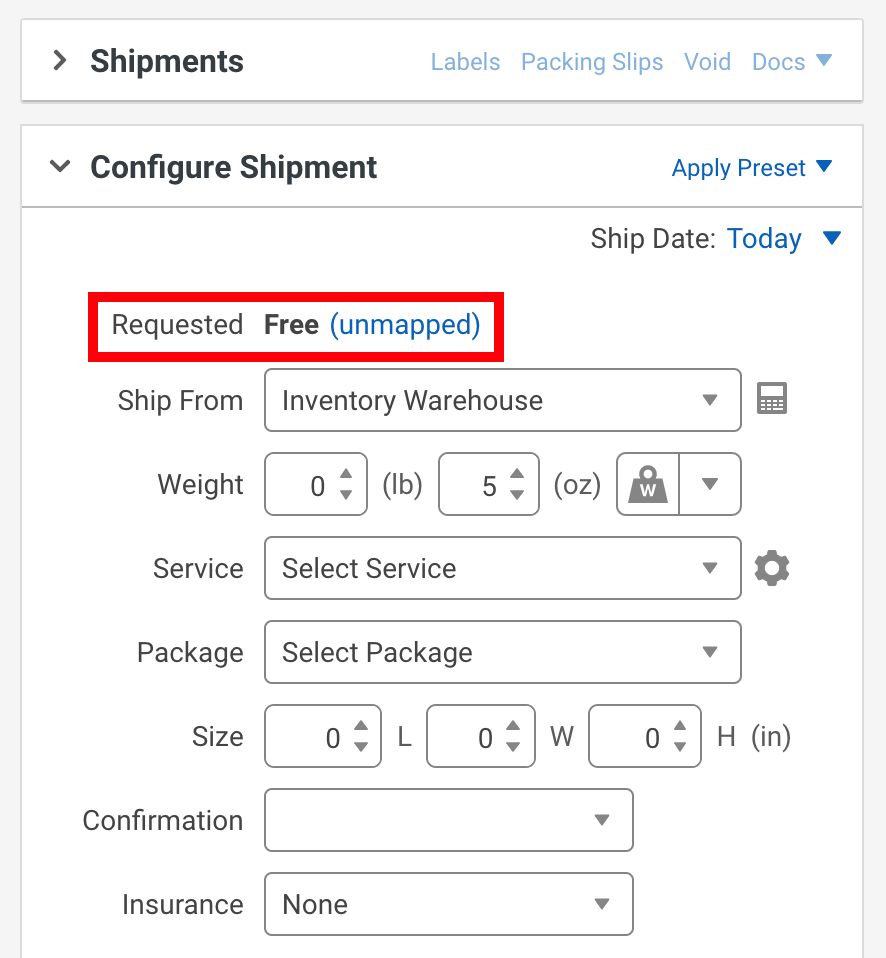
Additionally, you can configure shipping presets on the store level. Simply go to the store settings and enter the service mappings you have set up in Shopify (or any other supported store) and enter the name of the store and the shipping service. You can learn more about setting this up on the service mapping help article.
Automation Rules
Automation Rules have the most customization of any import automation process. They also apply last in the series of import automations, with product defaults, product presets, and shipping presets applying beforehand. So, make sure that you have your automation rules set up properly.
How Automation Rules Work
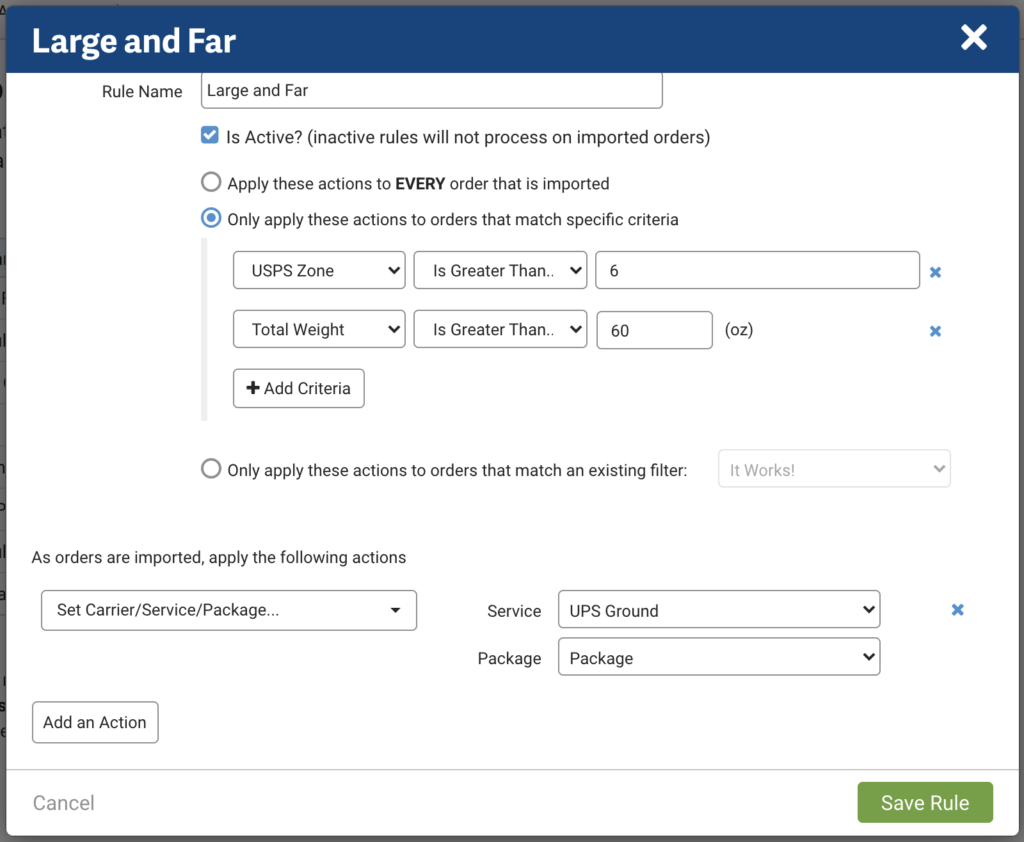
Automation rules are based on a criterion or set of criteria that you configure. For instance, any order weighing more than 5 lbs that’s going to a USPS zone of 6 may be less expensive with UPS than it is with USPS. You can set up your account to automatically apply UPS Ground to any order that meets these criteria. It would be set up like this:
Bulk Updates
If you wish to override any order import automation process, you can manually configure an order or you can apply a bulk action. As with automation rules, a wide array of things can be applied via a bulk update. Anything from putting an item on hold, to updating a shipping service, to assigning orders to different workers are all possible when applying a bulk action in ShipStation.
International Shipping Made Simple
International shipping can be an obstacle to many growing merchants. But while it is more difficult and expensive than domestic shipping, it’s not as challenging as it may appear. Sure, it has narrower profit margins, but knowing what to expect can simplify the process. Once you know how to charge and ship customers, it is not nearly as complex or expensive as you may think. Finding ways to grow your business into foreign markets can further establish your business internationally.
What’s Required to Ship Internationally?
To ship internationally, you need to have customs forms and other appropriate documentation included. Luckily, these are generated in ShipStation. ShipStation won’t print an international label without customs forms being generated. However, this does not mean that the included forms are everything required for your shipments.
Some international markets like Canada are relatively simple to ship to and carriers like USPS even generally include the customs information right on the shipping label. Some markets like Europe can be a little more complicated due to changes in VAT taxes.
The best way to ship internationally is to have carriers that support shipping outside of the US. With ShipStation, you get access to discounted shipping rates from top carriers around the world. To find the most affordable carrier options, head to our cheapest way to ship section.
Furthermore, international shipping may require or advise you to use harmonization codes. These allow your shipments to more easily pass through customs. It is advisable to use these in addition to customs descriptions. It may require less inspection when crossing into a new country.
How to Get Started with International Tax Filing
Finding ways to comply with international taxes and other requirements is not something ShipStation handles. While you can certainly create international shipments in ShipStation and have your customers pay the import fees on their orders, you may need ways to take your compliance and strategy to the next level. Services like Avalara enable you to streamline international taxes and duties so your international shipments can reach their final destination more quickly and efficiently.
What ShipStation Generates for International Shipments
ShipStation supports a wide range of customs forms. There are some use cases where you may need to produce additional customs forms or set up various international endorsements outside of ShipStation, but those will not impact the average Shopify seller.
Does ShipStation Automatically Generate Customs Forms?
If customs forms are required for a shipment and it’s a supported customs type, ShipStation will create the form and it will print out with the shipping label. Additionally, if your customs forms are submitted electronically, ShipStation will transmit this through the carrier. And whenever the shipment crosses the border, any new documentation or label that needs to be applied to the parcel will be. Furthermore, you will need to fill in customs declarations for your shipments.
How to Enter Customs Line Items
Customs line items can auto-populate based on the items in the order, or you can create your own customs line items. Additionally, you can prefill your customs forms for international shipments.
Customs Forms ShipStation Creates
We print out customs forms for USPS, UPS, FedEx, DHL Express, and more. But we also support electronic submission of customs forms. This includes:
- EDI: Electronic Data Interchange, used by UPS
- ETD: Electronic Trade Documents, used by FedEx
- PLT: Paperless Trade, used by DHL Express
For more information on the types of customs forms you can print in ShipStation, how to access them, and what is and isn’t supported, read our International Shipping guide.
Paying Taxes and Duties
Duties and taxes are some of the more annoying parts of international shopping. Ultimately, these are seen as ways of offsetting the fact that these items could have been manufactured or bought domestically. But the average customer or merchant isn’t usually too concerned with the scope of global commerce when they’re ordering a shirt from someone.
Do I Pay Customs Fees or Does My Customer?
If you simply create a shipment as is, the recipient is responsible for paying their shipment’s customs fees. These fees are associated with the customs forms filled out prior to label generation.
Bill Duties to Payor
If you wish to pay the duties instead of your customer, select the Bill duties and taxes to payor of shipping charges option on available shipments. This will allow you to pay instead of the customer. Frequently, merchants that pay the shipping duties tend to inject the costs into the shipping fees they charge customers at checkout. This just makes for a more seamless shipping experience for international customers.
Can I Print International Return Labels?
Neither ShipStation nor any of our carrier partners offer the option for international return labels. Due to the complexity of international shipping, you will need to have your customer initiate the return process by heading to their local carrier and initiating an outbound shipment to you. One way to account for this is to automatically assign a different email template for international shipments outlining any potential return steps.
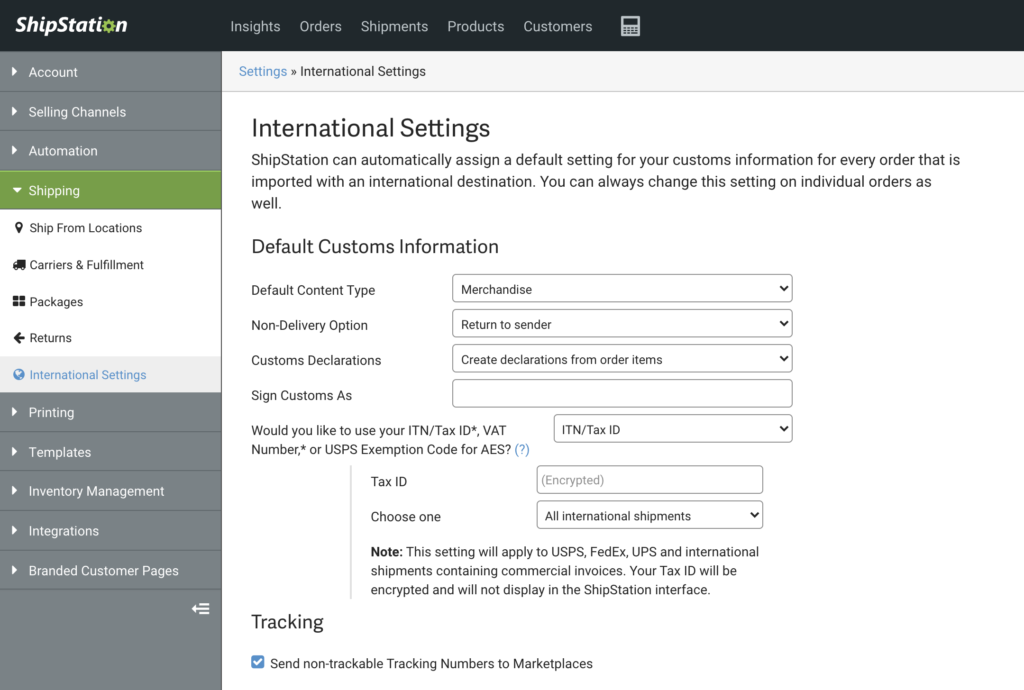
What If an International Shipment isn’t Delivered?
For shipments that cannot clear customs or are unable to make final delivery, you have the option to return to sender or treat as abandoned. These are options and more are found on the International Settings tab in ShipStation:
Picking, Packing, and Printing Orders
When you start using ShipStation, you realize that it is more than just a computer program. It is a way to connect your warehouse with your customers’ parcels. Efficiency is key. Sure, our import automation processes save you a lot of time and reduce data entry, but those would be nothing without a real-world component to that automation. ShipStation helps streamline picking and packing workflows by verifying contents of packages and creating clear worker roles for shipping. Now that we’ve gone over some of ShipStation’s key software components, let’s dive into more of the hardware side of things from scanners, printers, and how the mobile version of ShipStation’s app lets you use your phone as a shipping tool.
How to Pick Orders
ShipStation offers more than just a way to print labels. It is also a shipping management tool that gives you efficient ways to pick the items for your orders, verify the items in the orders are correct, and pack them into boxes without fear of missed or double-shipped items. To start out, these are ways you can figure out which items need to be picked within ShipStation.
Packing Slip
Packing slips are commonly included with an outgoing parcel to show which items are in a customer’s order. Some businesses, especially smaller ones, just use packing slips to pick and pack items into the package. This can work if you are printing orders individually. But once you start packing multiple orders at once, it’s best to move to something with a larger scale.
Pick Lists
Pick lists are item-centric documents that let you see which items were ordered in the current batch of orders you’re processing. These are frequently not picked at the same time as they are packed. Instead, they allow you to gather all the items at the same time so you can then sort and pack. These are frequently used with features like Scan-to-verify that we will go over shortly.
Order Summary
Order summaries are somewhere between packing slips and pick lists. They are like a pick list that is broken up by order number. If you can separate and sort your different items based on the corresponding order, this may be the best way to go.
Scan-Based Workflows
Scanners are very helpful for picking and packing workflows. They allow you to accurately verify the contents of each parcel.
Scan to Print
Scan to print allows you to scan a packing slip’s barcode to access the order detail modal to print the label for an order… instead of having to search within ShipStation. This saves time in picking and packing workflows when you ship multiple orders at once.
Scan to Verify
Scan to Verify takes scan-to-print a step further. It requires you to scan the UPC barcode of each order item before you can print the label. This is a good option to use particularly with new or training staff members as it further removes the risk of duplicate or wrong items.
Assigning Orders and User Roles
Assign Orders to Users
Assigning orders to different warehouse workers is another way that ShipStation lets you avoid duplicate orders being picked. It also just creates clearer pick lists for employees. With ShipStation, you can manually assign orders to employees or use automation rules to assign orders. This allows for even more hands-off shipping.
User Permissions and Restrictions
Additionally, you can use ShipStation’s user permissions and restrictions to make sure that the right employees have access to everything they need and only what they need. These are set up to make sure that only certain employees have access to credit card information, buying postage, printing labels, or viewing reports. User restrictions also make it simpler to make sure that employees assigned certain orders can only view the orders assigned to them.
Batching
Batching is a very important feature of ShipStation. Generally speaking, if you are automating your workflow and not manually configuring individual orders, batching is the logical conclusion of this. You can simply select up to 500 orders at once and click “generate labels” and the labels print out at once. It works well in conjunction with features like pick lists or order summaries, too. Along with automation rules, batching is often cited as ShipStation users’ favorite feature. With good reason! It can shave hours off of a workday and allow you to work with a leaner warehouse crew. Features like batching let ShipStation be a scalable shipping solution, keeping staffing where it is and letting you grow your business without having to grow your operation size.
ShipStation’s Cloudprinting App: ShipStation Connect
A shipping platform that makes shipping easy should also make printing the shipping labels easy, right? That’s why ShipStation offers a few different ways to print. You can download the PDF if you want, but we also offer ShipStation Connect. ShipStation Connect not only lets you print the labels automatically without having to save the labels to your computer (you can also reprint ANY shipping label from the Shipments tab) but you can print to any printer that is connected to a computer running ShipStation. This lets you print from your office to your warehouse. Even if your warehouse is across town, in another state, or on the other side of the world.
Mobile App
ShipStation’s Mobile app is a great way to access ShipStation on the go. While it doesn’t have the full functionality of the computer version, it does offer a lot of the core functionality you need to get ship done on the go.
Generate and Print Labels
ShipStation’s Mobile App lets you import orders, create new shipping labels, and print them. You can also view and reprint from the shipments tab as you would in the standalone app.
Check Reports
Just like in the web app, you can view reports on the go with the mobile app.
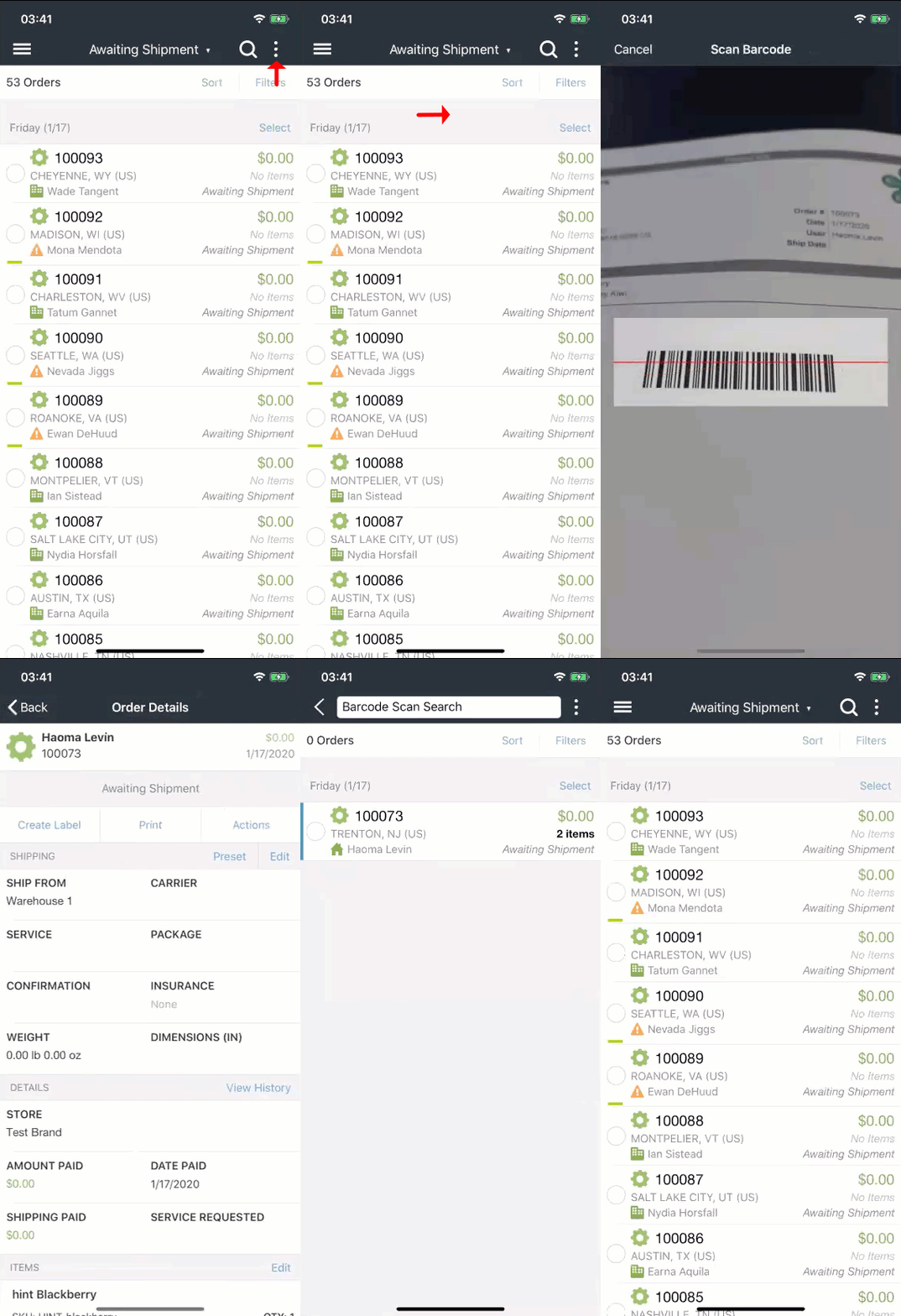
Scan to View
Want to print a label without having to search through the mobile app? Scan to View works on your phone without the need for an additional scanner. Just scan the barcode and you can retrieve the order and generate postage.
EOD Barcodes
More barcode functionality is the end-of-day form. You can generate a barcode that the carriers can scan from your phone to accept your day’s parcels.
Full List of Mobile Features:
- Import Orders
- Create and Print Shipping Labels and other documents
- Receive Alerts for New Orders
- View updates on Order Statuses
- Add Tags or Notes to Orders
- Assign Orders
- Apply Presets to Orders
- Cancel Orders
- Put Orders on Hold
- Void Labels
- Create Returns
- Add Postage to Postage Balance (Android App Only)
- Verify and Edit shipping addresses
- View and Track Shipments
- Resend Confirmation Emails
- View analytic Insight reports for operations and sales
- Generate Barcodes for End of Day forms for USPS
- Use your device as a Barcode scanner to pull up orders
Returns, End of Day Forms, and Carrier Pickups
An order is not complete when you box up a shipment and slap a label on it. You still have to get the package to the carrier as you and its recipient wait for final delivery. Combine this with every other shipment you have going out to a customer and any returns you have to deal with and you have a separate shipping vertical to worry about altogether. This final step may be stressful, but properly dealing with delivery and returns is a great way to elevate your brand’s image with customers. Figuring out how to offer returns and hand packages to the carriers are the last things you need to know to get started with ShipStation.
Mastering Returns
Returns are no one’s favorite part of shipping. As we mentioned in an earlier section, returns are expected by consumers and 90% of them expect them to be simple. Ecommerce is rapidly evolving. Gone are the days when you have to call someone to get assistance with an order—ironic, considering so much shopping and business is now done on phones. Since people can place orders online so easily, the same expectations are beginning to emerge for returns. And having a seamless strategy for printing return labels is a great way to cut down on processing time and find the most cost-effective ways for your customers to return their items.
How to Create Return Labels
Creating a return label can be done in a few ways. You can create it yourself and email it to the customer. You can include a prepaid or a pay-on-use label with the outbound parcel. You can also have a customer send a return back by going to a carrier facility, creating the return label, and reimbursing them. Or, you can create allow the customers to create the return label themself.
Types of Return Labels You Can Create in ShipStation
Pay-On-Use Return Labels
Pay-on-use return labels are return labels that you only pay for if you use them. These are generally only available through invoicing carriers such as FedEx or UPS. However, some USPS account types offer this, but it is rare and usually only reserved for really high-volume accounts—50,000 shipments or more a year.
USPS Return Labels
USPS returns are usually the easiest for customers to drop off. You just print the label and drop it off at a post office or in a mail receptacle. However, they do have a few caveats that make them more difficult than UPS or FedEx. USPS return labels are generally prepaid. This means you have to pay to generate the label regardless if the customer uses the label or not. However, USPS return shipping is generally quite simple to initiate since they are affordable for small parcels. With many locations, even the most rural customer can find a convenient place to generate return labels.
FedEx and UPS Return Labels
UPS return labels and FedEx return labels offer an advantage over USPS—pay-on-use returns. This allows merchants who deal with a high volume of returns to include the return label in the box with the outbound shipment.
Offering Returns
Return Policy
Ecommerce shopping has become so hassle-free that customers and retailers alike have become accustomed to not having to actually communicate with the other party. This has become so commonplace that it is extending to returns.
Creating a winning returns policy doesn’t have to break the bank, and again, customers will check a website’s return policy before placing an order. Generally, 14-day, 30-day, or 60-day return policies are what merchants offer. This return window increases some during the holiday season too.
Self-Service Returns
Self-service returns are a favorite among customers. Instead of having to deal with long wait times or waiting for you or someone on your team to generate and send them the label, you give them the option to create the return label without reaching out to you. Or, at most, they get email authorization containing a link to initiate the return. We found that 81% of customers prefer the option to print the label at home over going to a carrier facility to print one.
Free Returns vs Charging for Returns
Obviously, customers prefer free returns. However, it’s not always possible to offer. Unless items can be returned using something affordable like USPS First Class Mail, free returns can affect profit margins, making it too expensive to offer. A key reason Amazon wins customers is their commitment to “The customer is right.” This is why many merchants don’t list their highest-cost or heaviest items on Amazon or similar marketplaces. So if you can’t offer returns for free, find a way you can offer returns affordably!
Flat-Rate Returns
Customers hate surprises. This is why offering easy-to-understand flat-rate returns may be the simplest option. Something like $5 returns that gets deducted from a refund can be a good compromise. But, the customer first needs to know they are getting a complete refund on the item cost.
Post Shipment Features
So, you’ve printed your shipping labels and your shipments are ready to go out. Now what? Shipping doesn’t end with the shipment being created. There are still documents that need to be printed, packages to drop off, and, worst of all, returns to deal with.
End of Day Forms
End of Day forms are advised for American carriers, but the USPS, UPS, and FedEx don’t actually require them to charge for shipping the way other carriers do around the world. These allow you to hand over your day’s shipments to the carrier without the driver needing to scan your parcels in one by one.
Schedule a Pickup
When you’re ready to have your packages shipped, you don’t have to drive them to a carrier facility. With ShipStation, you can request a carrier pickup. This schedules a provider to come to you to receive the parcels on the next business day. At this time, you can schedule a pickup in ShipStation for the following carriers:
- USPS shipments (when using a Stamps.com account)
- DHL Express
- FedEx
- UPS (when using ShipStation Carrier Services)
Conclusion
Shipping doesn’t have to be complicated. ShipStation’s main goal is to simplify and streamline your fulfillment process so you can focus on growing your business. As ecommerce expands and transforms, you need an adaptive shipping platform that can keep up with your growth. If you’re using Shopify, you’re good on the selling side. ShipStation just fills in your warehouse strategy. As you incorporate more elements into your tech stack and you expand beyond your current scale, ShipStation and Shopify can grow with you.
One place for your business
Begin a free trial to see what’s possible with ShipStation.